yes, my webroot is var/lib/tomcat/webapps. No 7 in my tomcat folder, but yes, this is my root folder. In here i have my webapps folder and it works. So it's my root folder
It doesn't work
Not
http://www.deltapubblicitasrlshop.it/.well-known/acme-challenge/1234.html
not
http://www.deltapubblicitasrlshop.it/.well-known/acme-challenge/1234
both have http status 404 - Not Found.
A http status 200 and the content of your file must be visible.
Uh, @JuergenAuer, better check again. 
which folder was that?
var/lib/webapps/ is my root. And the folder is var/lib/webapps/.well-known/acme-challenge/1234.html
sudo certbot certonly --cert-name deltapubblicitasrlshop.it --webroot -w /var/lib/webapps/ -d "deltapubblicitasrlshop.it,www.deltapubblicitasrlshop.it" --dry-run
the dry run was succesfully
sudo certbot run --cert-name deltapubblicitasrlshop.it -a webroot -w /var/lib/webapps/ -d "deltapubblicitasrlshop.it,www.deltapubblicitasrlshop.it" -i apache
- Congratulations! Your certificate and chain have been saved at:
/etc/letsencrypt/live/deltapubblicitasrlshop.it/fullchain.pem
Your key file has been saved at:
/etc/letsencrypt/live/deltapubblicitasrlshop.it/privkey.pem
Your cert will expire on 2021-01-03. To obtain a new or tweaked
version of this certificate in the future, simply run certbot again
with the "certonly" option. To non-interactively renew all of
your certificates, run "certbot renew"
Have to do something else?
THANK YOU VERY MUCH

@JuergenAuer deserves the credit here though. I'm just the messenger. 
I can't seem to see your https though...
But https://www.deltapubblicitasrlshop.it does not work 
Try restarting apache if you would.
Already done. Apache and tomcat service restarted
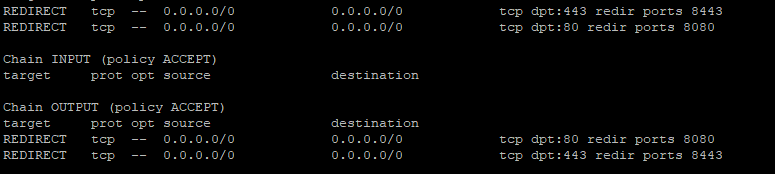
I noticed a typo in your port forwarding at the beginning. Did you forward 8443 to 443?
Tomcat requires additional steps to use the certificate.
I don't use Tomcat, so I don't know what you have to do.
Check the documentation of your system.
Looks like the Tomcat port 443 doesn't start. But port 80 works.
Here you go:
If you need any further help once you read through, let us know. We may need to modify the command to use your own csr. Whatever the route you go, just let us know.
Start here. This will be immensely helpful:
I read some guide, but i have a problem. I understood that i have to convert my .pem file in .pkcs12, right? But all my .pem file (cert.pem, chain.pem, fullchain.pem end privkey.pem) or only some of this?
And another question: the folder of my project can stay in webapps, or i have to move it on./well-known/acme-challenge?
To make a PKCS#12 file, you will need to use the private key (privkey.pem) and either the public cert (cert.pem) or the public cert plus intermediate chain (fullchain.pem)
Try it with:
privkey.pem & fullchain.pem