Could not issue an SSL/TLS certificate for www.domain.com

Please fill out the fields below so we can help you better. Note: you must provide your domain name to get help. Domain names for issued certificates are all made public in Certificate Transparency logs (e.g. crt.sh | example.com), so withholding your domain name here does not increase secrecy, but only makes it harder for us to provide help.

My domain is:www.comapanuevolaredo.gob.mx

I ran this command: in Menu goto "Tools & Settings" -> select SSL/TLS certificates ->
in these section click on button "+ Lets Encypt", next window or
page, fill the text boxes email address:
websistemas.comapanld@gmail.com
Domain name: www.comapanuevolaredo.gob.mx
then click on button "Reissue" .... waited......

It produced this output:

Could not issue an SSL/TLS certificate for www.comapanuevolaredo.gob.mx
Details
Could not issue a Let's Encrypt SSL/TLS certificate for www.comapanuevolaredo.gob.mx. Authorization for the domain failed.
Details
Invalid response from https://acme-v02.api.letsencrypt.org/acme/authz/2531215931/557744714281
Details:
Type: urn:ietf:params:acme:error:dns
Status: 400
Detail: During secondary validation: DNS problem: SERVFAIL looking up A for www.comapanuevolaredo.gob.mx - the domain's nameservers may be malfunctioning; DNS problem: SERVFAIL looking up AAAA for www.comapanuevolaredo.gob.mx - the domain's nameservers may be malfunctioning

My web server is (include version):Version 18.0.70 Update #3

The operating system my web server runs on is (include version): windows server 2016

My hosting provider, if applicable, is: www.akky.mx

I can login to a root shell on my machine (yes or no, or I don't know): to command promtp (CMD) in windows or powershell

I'm using a control panel to manage my site (no, or provide the name and version of the control panel): Plesk obsidian web pro edition

The version of my client is (e.g. output of certbot --version or certbot-auto --version if you're using Certbot): don know if using one

Hello @ComapaNld, welcome! :slight_smile:

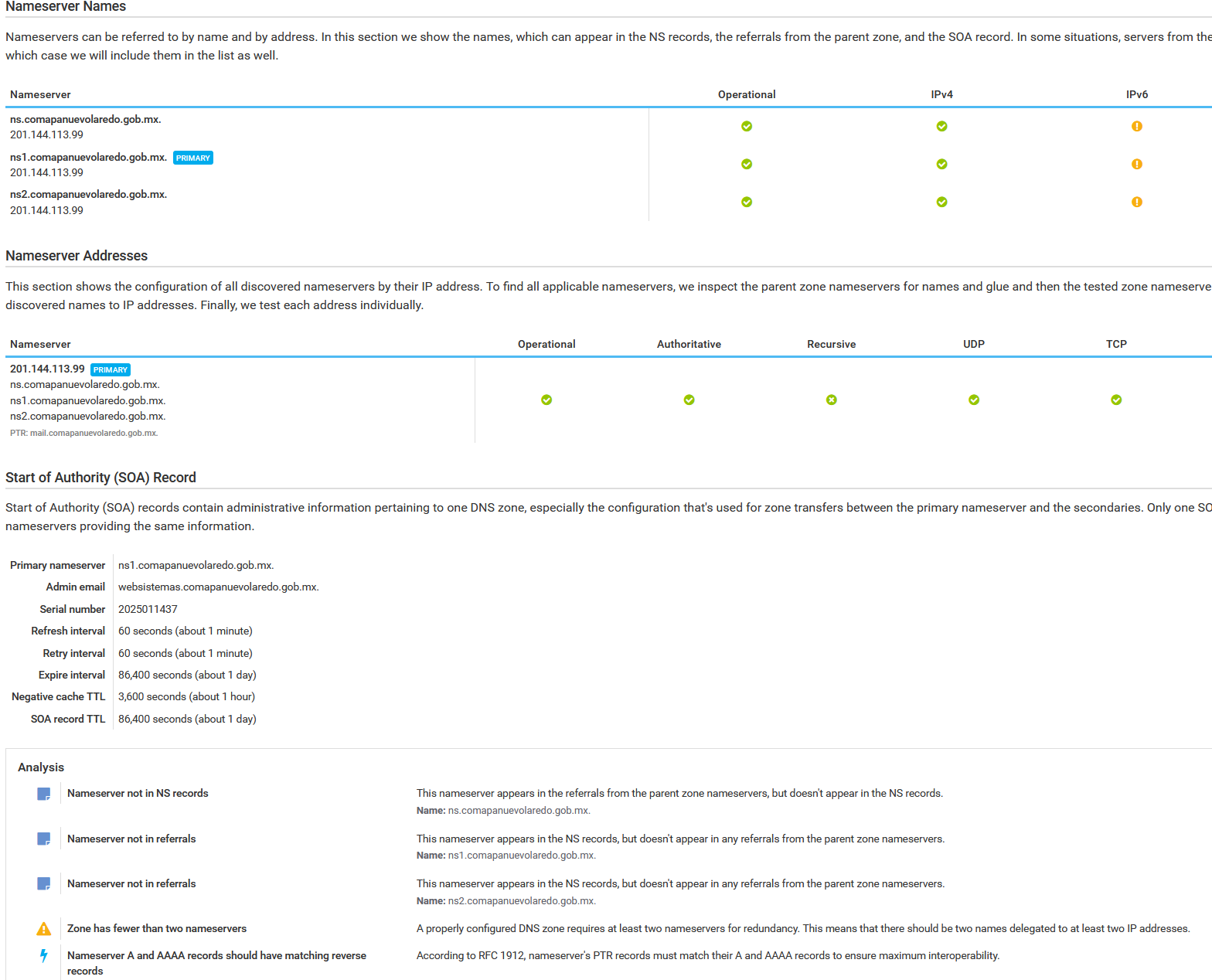
It seems there are DNS issues including Name Server issues, please see:

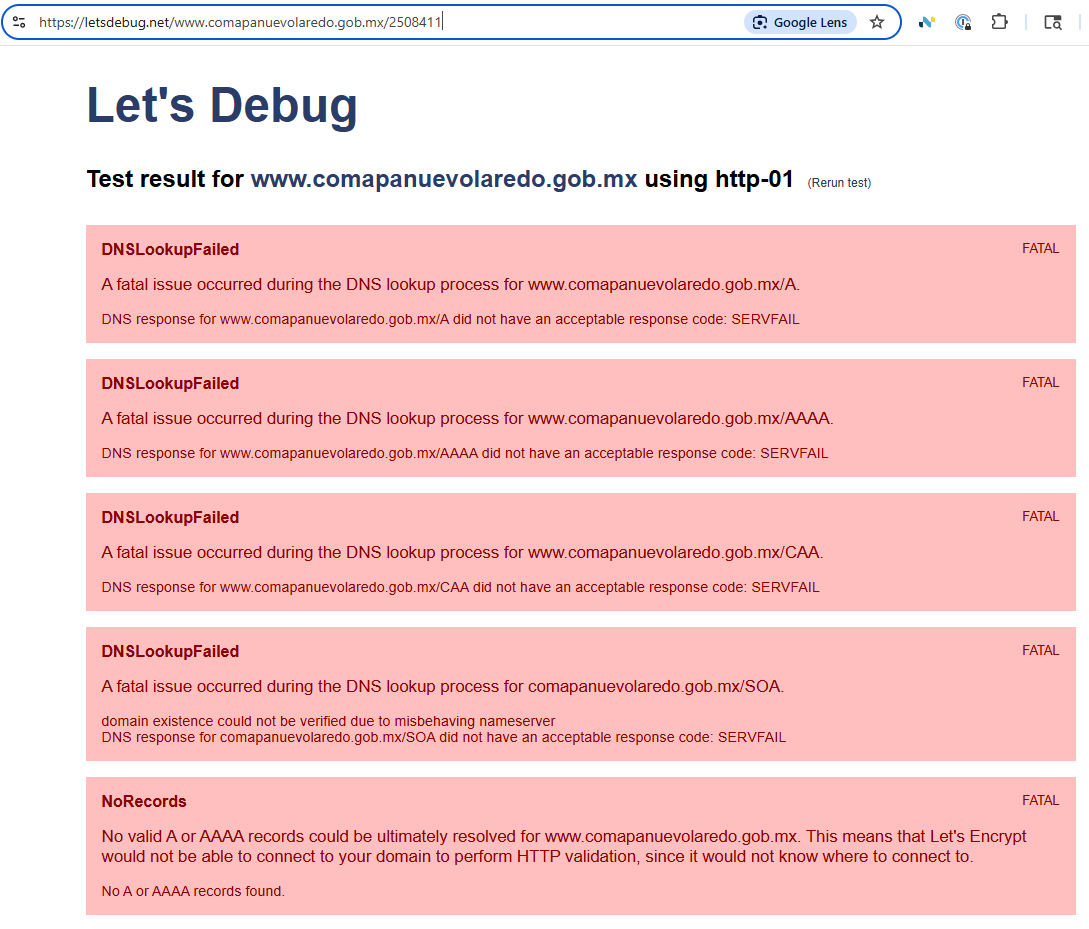
Also using the online tool Let's Debug is seeing similar issues as well;
https://letsdebug.net/www.comapanuevolaredo.gob.mx/2508411

4 Likes

Yeah it looks like your DNS nameserver ns.comapanuevolaredo.gob.mx is refusing some or all queries, possibly because it's down or a firewall is blocking TCP/UDP port 53

5 Likes

No im getting the following
Could not obtain directory: cURL error 6: Could not resolve host: acme-v02.api.letsencrypt.org (see libcurl - Error Codes) for https://acme-v02.api.letsencrypt.org/directory

I am still seeing basically the same results as before.
https://letsdebug.net/www.comapanuevolaredo.gob.mx/2519204

1 Like

im getting an event on my DNS server dat a TCP packet is corrupted, from the fortinet ip, and it has the DNS package, containing record A
Could these be the issue?

Hi @ComapaNld,

Yes, very likely.

Edit

Also here Permanent link to this check report shows a majority of the world cannot get a results for DNS query.

Let's Encrypt uses Multi-Perspective Validation Improves Domain Validation Security - Let's Encrypt; Geoblocking can also be an additional issue here.
Please see the following:

Edit 2

Further DNS checking:

Edit 3

See Hardenize: Comprehensive web site configuration test

1 Like

Your DNS configuration is badly broken. I suggest fixing that first. Focus on the two Warning messages shown by DNSViz about the delegation and fix those. Once you fix those rerun the DNSViz test and the Error message might go away. See: www.comapanuevolaredo.gob.mx | DNSViz

Yes, this is also a DNS related problem but different. Your local system cannot resolve that domain name. This is not caused by the delegation errors but I don't know enough about your local system configuration to suggest specific changes. Setting up your local resolver is something to discuss with your hosting service or whoever provided your initial system.

3 Likes
$ nslookup -q=soa comapanuevolaredo.gob.mx ns1.comapanuevolaredo.gob.mx
Server:         ns1.comapanuevolaredo.gob.mx
Address:        201.144.113.99#53

comapanuevolaredo.gob.mx
        origin = ns1.comapanuevolaredo.gob.mx
        mail addr = websistemas.comapanuevolaredo.gob.mx
        serial = 2025011437
        refresh = 60
        retry = 60
        expire = 86400
        minimum = 3600
$ nslookup -q=ns comapanuevolaredo.gob.mx ns1.comapanuevolaredo.gob.mx
Server:         ns1.comapanuevolaredo.gob.mx
Address:        201.144.113.99#53

comapanuevolaredo.gob.mx        nameserver = ns1.comapanuevolaredo.gob.mx.
comapanuevolaredo.gob.mx        nameserver = ns2.comapanuevolaredo.gob.mx.
$ nslookup -q=a www.comapanuevolaredo.gob.mx ns1.comapanuevolaredo.gob.mx
Server:         ns1.comapanuevolaredo.gob.mx
Address:        201.144.113.99#53

www.comapanuevolaredo.gob.mx    canonical name = comapanuevolaredo.gob.mx.
Name:   comapanuevolaredo.gob.mx
Address: 201.144.113.99
$ nslookup -q=a comapanuevolaredo.gob.mx ns1.comapanuevolaredo.gob.mx
Server:         ns1.comapanuevolaredo.gob.mx
Address:        201.144.113.99#53

Name:   comapanuevolaredo.gob.mx
Address: 201.144.113.99
$ nslookup -q=a ns1.comapanuevolaredo.gob.mx ns1.comapanuevolaredo.gob.mx
Server:         ns1.comapanuevolaredo.gob.mx
Address:        201.144.113.99#53

Name:   ns1.comapanuevolaredo.gob.mx
Address: 201.144.113.99
$ nslookup -q=a ns2.comapanuevolaredo.gob.mx ns1.comapanuevolaredo.gob.mx
Server:         ns1.comapanuevolaredo.gob.mx
Address:        201.144.113.99#53

Name:   ns2.comapanuevolaredo.gob.mx
Address: 201.144.113.99

You really only have one name server that has two names.

And the domain name's servers are within the domain itself, sometimes that can cause an issue.

2 Likes

This topic was automatically closed 30 days after the last reply. New replies are no longer allowed.