You can see ping (icmp) requests work fine but that HTTP (tcp) requests fail.
These are requests directly to you and the HTTP request is for your "home" page. Nothing to do with Let's Encrypt challenge specifically.
I would also double-check that panel you showed for your Spectrum Business. It said something about HTTP and HTTPS but you didn't show the details. Maybe something there needs adjusting.
So with the new customer grade routers they are not to configurable I can't inspect packets but only relay on their port forwarding which http/https is enabled, SSH is not enabled but it shows that the port is open, telnet is not enabled but on the router connected to my server allowed it. I am still trying to determine if this correct behavior given my configuration.
From the manual located here Download for Archer AXE300 | TP-Link
please read "Chapter 13. NAT Forwarding" and share the Port Forwarding configurations.
@Bruce5051
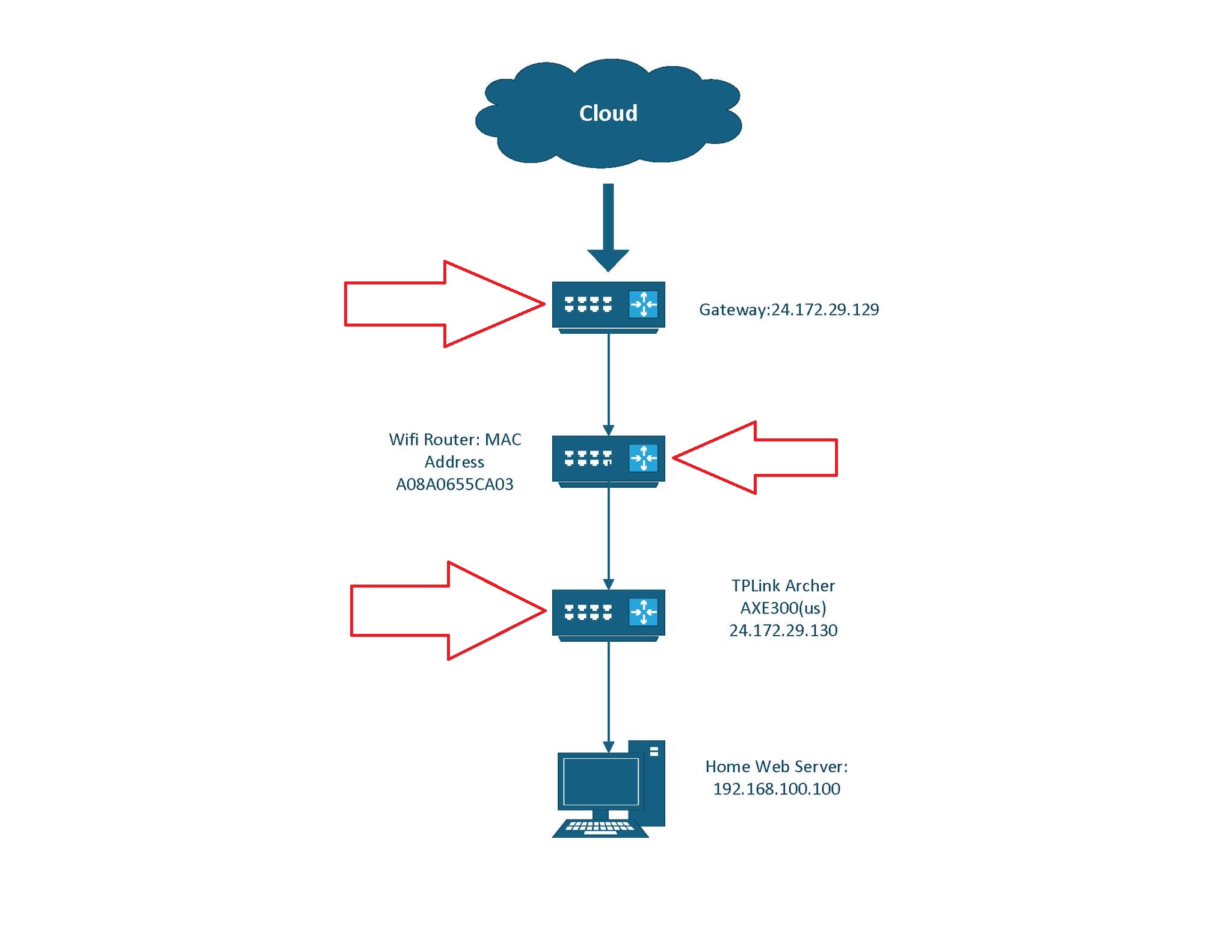
Each one of the red arrows points to a device that possibly can drop packets,
often base on TCP vs UDP and on Port number. Thus if TCP Port 80 is dropped
at even one of those devices the connection will not happen. It is also possible
that more than one of those devices can also drop TCP Port 80, so all the devices
between the Internet and your Web Server need to let TCP Port 80 though.
It does, again the problems is I can't inspect packet on the consumer grade routers to see if they are dropped. I implemented port forwarding for http(s) but some reason telnet and SSH and even ftp was working but not the https. I will keep you posted and thanks for the help TP-Link and Let's encrypt so far...
I would only be able to see packets from the source and if I routed to a different source. Again, the consumer routers to my knowledge doesn't allow that (packet inspection) unless Spectrum has internal access that is inaccessible to me; which I am reaching out to them next after I reach another tier of technical support with TP-Link.
It depends on the services. Telnet made it through but was not configured for port forwarding on the spectrum gateway/router which is concerning. Let me look...
@Bruce5051, would a packet capture from a external source trying to access the site work? What would I need to listen for other than incoming port 80/443 http(s) traffic on the home server with local IP address 192.168.100.100?