If it’s still there after all of your attempts to stop it, then please use the kill command I suggested.
I tried that command that you suggested… it was invalid
Ah. If it says “command not found”, you may need to get it from the psmisc package:
yum -y install psmisc
or
apt -y install psmisc
(depending on your operating system).

It’s still there. That text:
*:http
is an alias for *:80 (port 80).
I guess you could also try stop it with:
httpd -k stop
but killall -9 httpd seems like the most reliable at this point.
killall -9 httpd does not work
In what way? Does it produce an error message? Or does it not produce any output?
sudo? perhaps not admin. Just a heads-up @_az. He does have two other webservers running for two other subdomains.
They are on different servers than this one, right?
@freessltools.com @_az when I run bncert-tool it continuously say that port 80 and 443 are being used. I used /opt/bitnami/ctlscript.sh stop and systemctl stop apache2 to stop the services but it yet says that 80 and/or 443 are tied up. And it appears that this Linux only uses ss commands to list and kill processes.
i finally killed the PID and it is processing. All of my services are down. do I need to restart them? what do I do immediately when the certs are made?
@freessltools.com @_az the process finished and it said that it did everything EXCEPT start the webservers… is this good bad or indifferent? What should I do?
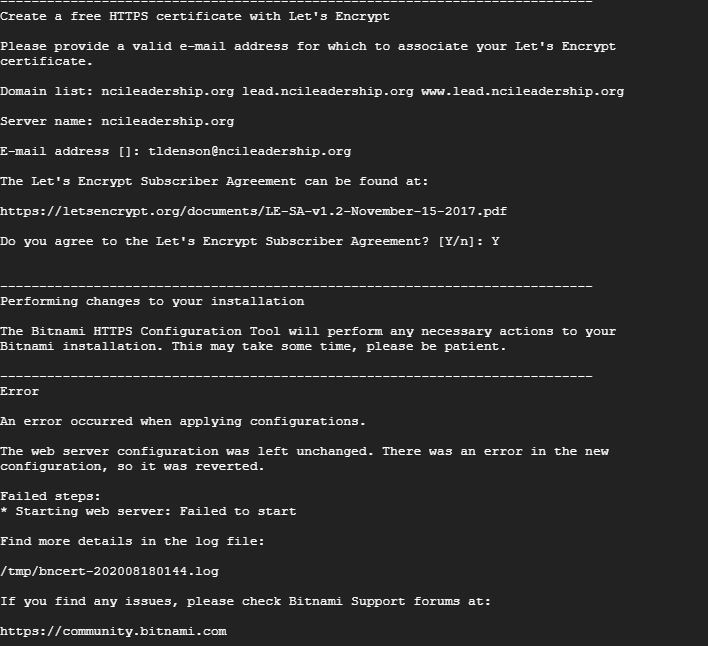
You’re still missing www.ncileadership.org
I think the problem might be that you have two Apache servers installed.
There is an Apache server that comes from Bitnami - that’s in /opt/bitnami/. You also seem to have another one (that’s in /etc/apache2, and it’s known as apache2.service).
When the two try to run at the same time, there’s a conflict.
What happens if you:
systemctl disable apache2
systemctl stop apache2
/opt/bitnami/ctlscript.sh restart
1 Like
that’s ok. I don’t need that one.
@_az thanks… but I have processed beyond that. I was able to get the PIDs stopped that had the ports 80 and 443 hung up. Thanks
Uh...
https://ncileadership.org redirects to https://www.ncileadership.org
Are you planning on removing that redirect?
I am not concerned with neither of those.
don’t I have to start the services first… before trying to seek the urls?

What domains exactly are you certifying? I'm so confused.
I'm talking about something else, not about the PID issue.
Notice when you visit http://www.ncileadership.org/, you see "It works!" instead of Moodle.
The "It works!" page suggests that the wrong Apache server got started after bncert created its certificates.
1 Like