I searched what I could in Let's Encrypt and Certbot, but I didn't find anything that answered my question, and I'm not even sure how to ask for what I need:
Does CertBot / Let'sEncrypt provide certificates for URLs that redirect to Google Sites?
Symptom:
We bought a few URL's to redirect to Google Sites pages, but when anyone types in the URL, it says the website is not secure... Even though the Google Sites pages are https.
I am not coding the Google Sites pages, just WYSIWYG using their templates.
Thank you for pointing me in the right direction and for any help!
So there isn't anything different, from a certificate perspective, between a web server that returns a "redirect" response code for all or most paths, and a web server that directly serves content.
So yes, a web server that is configured to return a redirect response can be set up with a certificate just like any other web server.
There may be other meanings of "redirect", though. Like, for a CNAME that just points to another name, the server that it points to would need to expect and create a certificate for the name that the user is using, since the CNAME is generally transparent to the web browser.
I think to get more specific help, you'd need to say more about how you're doing this redirection, and what web server is handling it. But if you're not administrating the web server yourself (like, if you're just using some sort of control panel, rather than configuring Nginx or Apache or something along those lines), then you'd need whoever is administrating the web server to set up it for you, or for them to have that control panel set up for you to do it, or that sort of thing.
The Google pages may be secured, but the start page is not:
HTTP
curl http://mrhaole.com/ <head><title>Object moved</title></head><body><h1>Object Moved</h1>This object may be found <a HREF="https://sites.google.com/view/mr-haole/mr-haole-main-site?authuser=0">here</a>.</body>
HTTPS
curl -k https://mrhaole.com/ curl: (7) Failed to connect to mrhaole.com port 443 after 77 ms: Couldn't connect to server
Q: Can't you use those Google pages via an FQDN from your domain?
Thanks Peter.
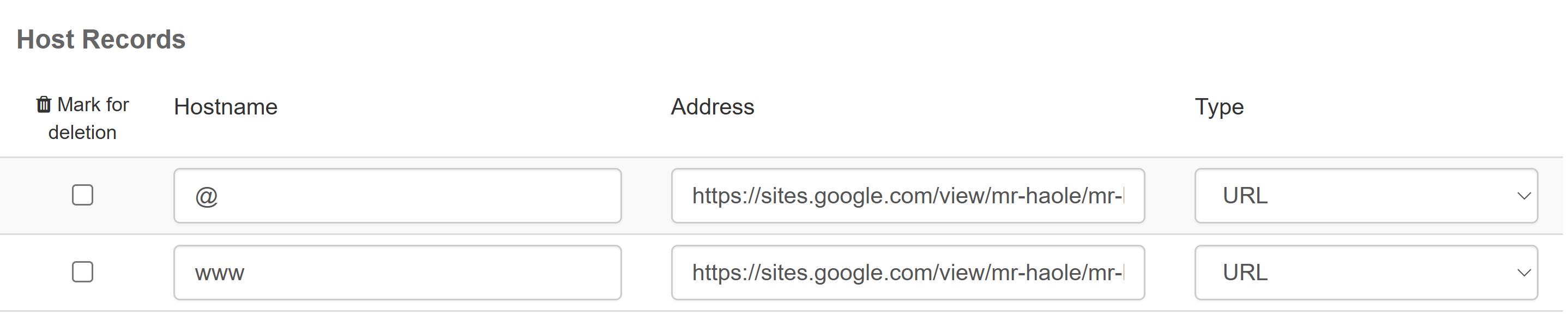
Below, they are saying that my URL is redirected through Enom, and it doesn't support https. Let's Encrypt on the URL is only available as an option with hosting, which we do not have because we redirect to a Google Sites page. I access through a dashboard where I've purchased my URLs for 20 years (ICDSoft). Screenshot attached.
Their reply: You are using the URL redirection functionality of the domain registrar Enom. Unfortunately, it does not support HTTPS, and it can't be enabled. Some browsers might be automatically upgrading the connection to HTTPS, even if you do not use https:// in the address. We offer Let's Encrypt certificates only for the hosting accounts on our servers.
Hi Rudy, thanks for the reply.
The main URL not encrypted for https is the root of my problem.
I need this explained like I'm a noob. I understand the basics, but not the acronyms. What is an FQDN?
Q: Is there something obvious I need to change in the or tag on the unencrypted site?
I've done https websites with let's Encrypt before, but it's always been associated with hosting, so the host provides it as a service.
However, this time, I purchased a URL specifically to redirect to a Google Sites page.
As you found out, it does not connect. Or sometimes, it returns as "unsafe."
I access the URL info through a dashboard at icdsoft.com (screenshot attached), not through any code or home server or anything.
Below are the dashboard options I see in "Host Records" where I assigned the redirect to the Google Sites page.
Thanks in advance for any "grade-school level" advice you have!
From your screenshot it looks like you are trying to point your domain DNS entries to google sites as an https URL, which is a mix up of concepts.
Your domain DNS (which is your control panel screenshot) specifies which names in your domain point to which IP addresses.
You can use CNAME dns records to point to other names on other domains but ultimately it will resolve to an IP address that's expected to know how to handle your domain (e.g. serve a website for it and configure https etc).
DNS doesn't talk http or https and it's not a web server, so it doesn't do http to https redirects, it only answers questions about which names point to which server, not what that server does (http,http, smtp etc).
Some web hosts/registrars do offer website forwarding, this is where your DNS points to their web servers, then their web servers redirect (or iframe etc) to the other website. That's different to DNS but it's sometimes mixed in with the same/similar control panel user interface.