Hi,
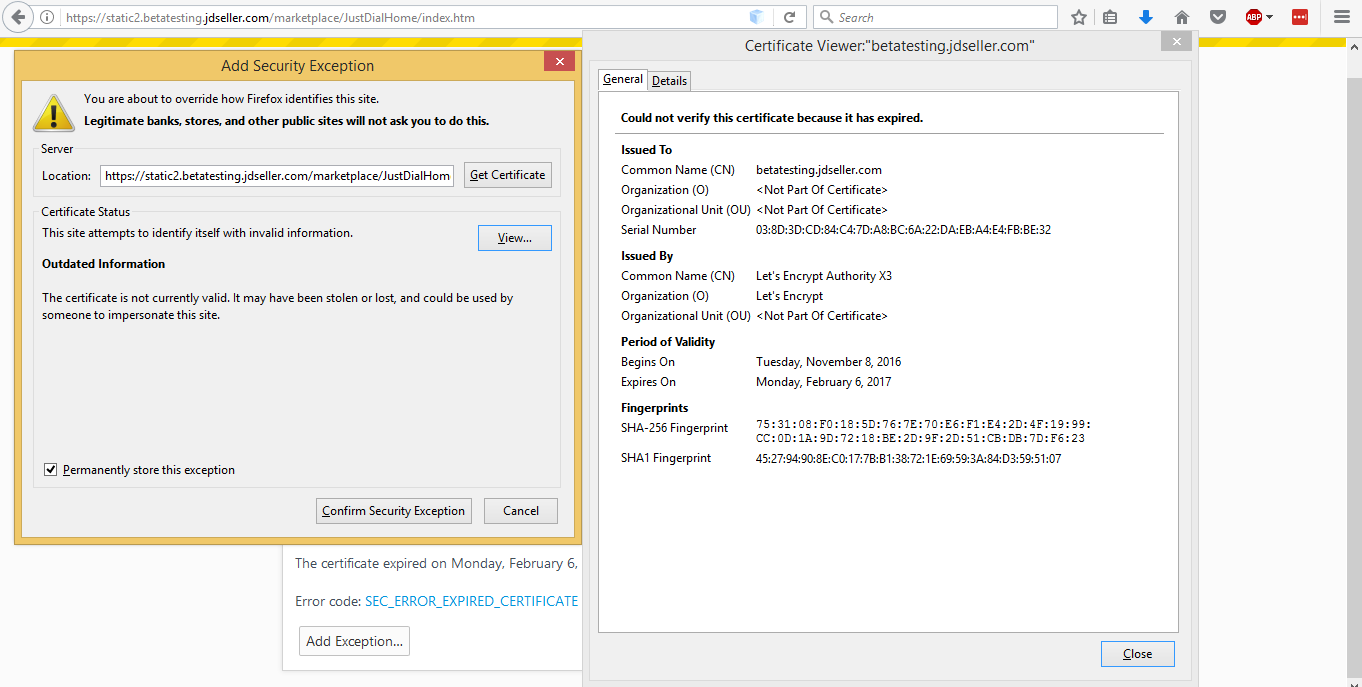
I’ve recently renewed my existing certificate. Post renewal I copied the certificate directory onto haproxy and reloaded haproxy but post reload mysql website is sometimes showing unsecure and at times secure
Best Regards,
Zahid
Hi,
I’ve recently renewed my existing certificate. Post renewal I copied the certificate directory onto haproxy and reloaded haproxy but post reload mysql website is sometimes showing unsecure and at times secure
Best Regards,
Zahid
What’s your domain name ?
Hi,
I’ve created SAN for my test website as follows:
betatesting.jdseller.com
statiic1.betatesting.jdseller.com
static2.betatesting.jdseller.com
static3.betatesting.jdseller.com
static4.betatesting.jdseller.com
static4.betatesting.jdseller.com
so sometimes it throws certificate expired randomly for any of the above domains and subdomains and at times loads https properly.
My certificate is on haproxy and my nginx is on another server.
This was working fine earlier but Post Latest renewal I’m facing this problem.
Kindly help!!
Best regards,
Zahid
You appear to be using 2 different certs in your config. One is showing
Issuer: C=US, O=Let's Encrypt, CN=Let's Encrypt Authority X3
Not Before: Feb 8 16:33:00 2017 GMT
Not After : May 9 16:33:00 2017 GMT
The other is the old cert
Issuer: C=US, O=Let's Encrypt, CN=Let's Encrypt Authority X3
Not Before: Nov 8 04:44:00 2016 GMT
Not After : Feb 6 04:44:00 2017 GMT
I'd suggest a quick check of your configs and make sure all of them are pointing to the "live" certificates and not the "achive" ones.
Hi,
Thanks for your prompt reply. However, my configuration is fine. I’ve double checked it.
I have renewed the certificate on server A (a few days back) and then copied the entire directory (ignoring the symlinks to …/…/archive/betatesting.jdseller.com on the same server) using “/etc/letsencrypt/live/betatesting.jdseller.com” to server B to “/etc/haproxy/certs” and then restart haproxy on server A and nginx and php on server B. Hope I’m doing things properly here.
Please suggest…
Best Regards,
Zahid
hi zahid
serverco is absolutely right
your SAN is not setup correctly you are using betatesting.jdseller.com certificate on your sub-domains
chrome seems to have no issues with your first domain and firefox doesn’t seem to mind after the first time
both chrome and firefox don’t like your subdomains
looks like one of your backed servers is also serving an old certificate
https://www.ssllabs.com/ssltest/analyze.html?d=betatesting.jdseller.com
a) obtain a SAN certificate for the root and sub domains (they all have to be SAN entries on the CSR)
b) disable weak ciphers
c) reinstall new certificate on all servers (proxies and backends) and reload them
Andrei
HI Andrei,
Thanks for your valuable inputs. The is no certificate at my backend server.
How can I remove the old SAN?
Also, is the following the correct way to get new SAN, please correct me if i’m wrong
./letsencrypt-auto certonly -a webroot --webroot-path=/var/www/test -d betatesting.jdseller.com -d static1.betatesting.jdseller.com -d static2.betatesting.jdseller.com -d static3.betatesting.jdseller.com -d static4.betatesting.jdseller.com -d static5.betatesting.jdseller.com
Best Regards,
Zahid
HI Andrei,
I’ve now reinstalled a fresh SAN for my domain and its sub domains but still I’m getting issues with my sub domains and at times expired certificate on main domain as well. I’ve removed all old certificates but still no success. Not sure if haproxy maintains any caches for old certificates.
I’ve installed fresh SAN using the following and then restarted
haproxy and my backend nginx but still no success:
./letsencrypt-auto certonly -a webroot --webroot-path=/var/www/test -d betatesting.jdseller.com -d static1.betatesting.jdseller.com -d static2.betatesting.jdseller.com -d static3.betatesting.jdseller.com -d static4.betatesting.jdseller.com -d static5.betatesting.jdseller.com
Kindly Help!!
Best Regards,
Zahid
Your default certificate on IP 125.18.61.66 is still the old certificate
Certificate:
Issuer: C=US, O=Let's Encrypt, CN=Let's Encrypt Authority X3
Not Before: Nov 8 04:44:00 2016 GMT
Not After : Feb 6 04:44:00 2017 GMT
Subject: CN=betatesting.jdseller.com
if you check your config I'm sure it's still pointing to the old certificate.
hi serverco,
Is the following the correct way to create a single SAN certificate with main domain (betatesting.jdseller.com) and subdomains (static1.betatesting.jdseller.com, static2.betatesting.jdseller.com, static3.betatesting.jdseller.com, static4.betatesting.jdseller.com, static5.betatesting.jdseller.com):
./letsencrypt-auto certonly -a webroot --webroot-path=/var/www/test -d
betatesting.jdseller.com -d static1.betatesting.jdseller.com -d
static2.betatesting.jdseller.com -d static3.betatesting.jdseller.com -d
static4.betatesting.jdseller.com -d static5.betatesting.jdseller.com
Please confirm.
Best Regards,
Zahid
Yes, the problem is not with the generation of the cert though - it is that you are still using an old cert somewhere.
I’d suggest checking the actual content of the cert files.
hi zahid
you have issued your certificate correctly https://crt.sh/?q=betatesting.jdseller.com
i see you have created several certificates
as you can see your HA/WebServers are still serving the old certificates
there is an article on how to to do this here: https://www.digitalocean.com/community/tutorials/how-to-secure-haproxy-with-let-s-encrypt-on-ubuntu-14-04
Andrei
When terminating SSL on HAProxy, ensure that:
a) You have combined the key, domain certificate and intermediate in the right order in the pem file for HAproxy
b) You are referencing the correct (and updated) pem file in HAProxy configuration
See this gist as a reference for example (“Create Requried PEM for HAProxy” and “Configure HAProxy to use this new PEM” sections).
This topic was automatically closed 30 days after the last reply. New replies are no longer allowed.