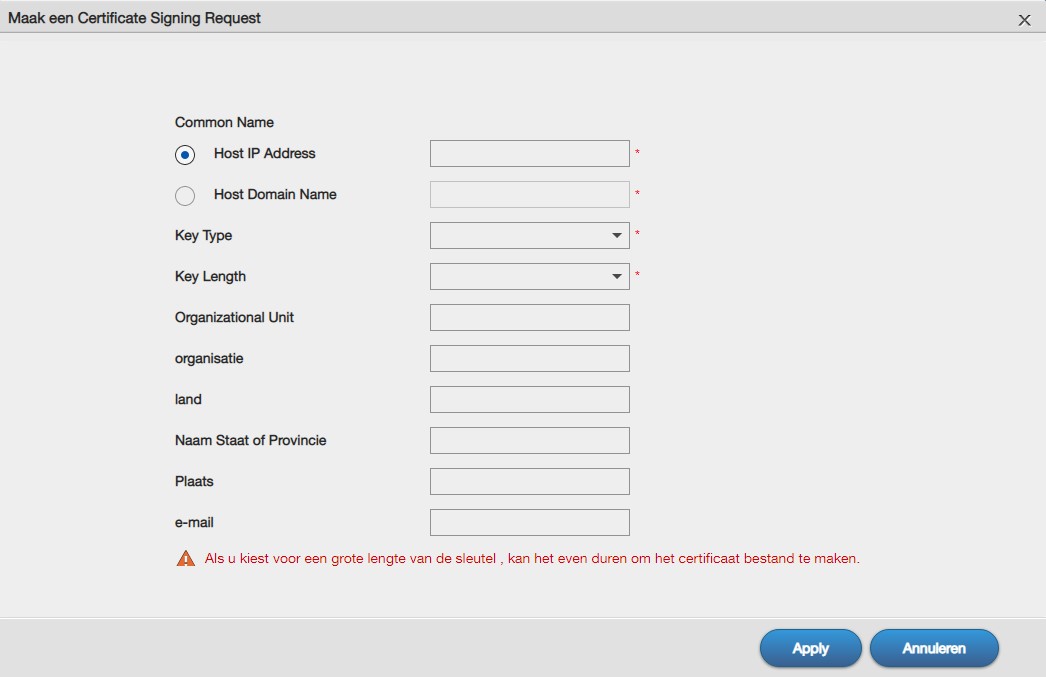
i bought a nas.
it has a possibility to create/use SSL. (see picture below)
not bothering to go into details why de system included certificate doesn't work at al.
but it also has an option to prepare a certificate, download it and...here it comes!! upload it to get it signed, have it returned and then i can import it.
sounds easy enough, only there is no way, really NO WAY to submit that file and get it signed. (step 4 & step 5 in the picture)
it's simply frustrating that what sounds easy enough turns out to be f**g impossible to achieve.
maybe someone here can help out, but honestly, my hopes are slim at best, sorry!!!
First things first before we get into a lot of effort which might not even be necessary: do you have a domain name pointing to the (public) IP address of your NAS?
frankgeerits.be (this one is apparently secured by ssl)
frank-geerits.be (not secured, http site has some content, not sure how to access it anymore after years of non use)
so somehow, somewhere i need to connect the domain name and the ip-adress of my nas
It's not any language I can read, but that flow (and the words I think I understand correctly) suggest the NAS is giving you a chance to generate a "Self-Signed Certificate" and install that Certificate + their own Certificate Authority's Root into your browser.
If that is the case, it is far outside the scope of LetsEncrypt.
Forget about everything except Step5. Try to get a Signed Certificate from LetsEncrypt for any domain you control, using any client, and see if you can upload it as Step5.
You may have issues on a certificate mismatch between the names on the certificate and the name your NAS is configured either on:
the NAS when you do Step5
your browser when you use it
Assuming this NAS is in your home/office and not on the Public Internet, What I think may work, is the following:
Set up a domain like nas.frankgeerits.be. Get a certificate signed for it; you can use a DNS authorization from your LAN with Certbot, or run a LetsEncrypt client on a webserver on the public internet.
Configure the NAS with with that domain name and certificate
Update your computer/router/etc to map nas.frankgeerits.be to the local IP address for the NAS server
If that works, you then have two options:
do this again every 3 months when the certificate expires
just keep using the expired certificate, which will likely give you the same UX as using a self-signed certificate
I'm sorry I interpreted things wrong on my initial reply. I thought I understood what was going on, then did an online translate on a few phrases to confirm, and saw "this CA", which really misled me.
There are options for that. It's a little bit gevoelig though, as Let's Encrypt is keen on promoting automatic certificate issuance and dislikes any option which requires manual intervention.
For example, as the Let's Encrypt certificates are just 90 days valid, you'd have to repeat the steps in your NAS at least every 90 days, but preferably sooner. That can get a little tiresome.
There are webbased clients on the internet. You'd need to look for one which enables you to upload CSRs. You'd also need a way to authorize your domain name. Normally that would be done by placing a specific file under a specific directory for Let's Encrypt to download and check. However, I'm not sure if that's possible with your NAS. So you could use the dns-01 challenge, which would require you to put a specific TXT DNS record under a specific subdomain (_acme-challenge).
You could check out https://gethttpsforfree.com/ which is an online ACME client. It requires you to do a few manual steps on your computer regarding the account keys et cetera (which is different from the certificate keys!). But by doing those steps manually, you're keeping control over your account to your self and not to a possibly malicious website.
There are NAS manufacturers with build-in Let's Encrypt clients. Unfortunately, yours isn't one of them it seems. Looks like Zyxel, correct?
It uses certbot as the ACME client and SFTP for the installation of the certificate. Doesn't really help IMHO: certbot needs to be ran manually as does the SFTP uploading steps. No real difference to any other client or the webbased uploading of the certificate.
I'm curious: why do you want a certificate for your NAS? It's not really required.. And personally, I wouldn't want my NAS to be publically accessible on the internet: I don't trust those guys and girls at Zyxel or any other company of NASses enough with regard to timely security updates.
There are many ACME clients that can submit the CSR your NAS system generates.
The problem is that Certificate Authorities require validation before they can sign your request, and using the Certificate is more complex than you may realize.
In order to sign your CSR, LetsEncrypt will need you to complete a HTTP-01 or DNS-01 validation. Both of these validations require many steps the various ACME clients automate.
A CA with Trusted Roots will generally only be able to issue Certificates for names on the public internet.
Validation typically requires asserting ownership of the domain name on HTTP port 80, or modifying DNS records
Usage requires public or local DNS pointing to the machine the certificate is on.
To get a Trusted certificate, from LetsEncrypt or elsewhere, you're going to have to configure a bit of DNS and possibly a webserver.
The other option is to use a self-signed certificate and importing that into your browser/operating system as a trusted. That is possibly a better option in your situtation.