Original is no longer valid Doc Root. Correct to copy and paste what you had:
<VirtualHost *:80>
ServerAdmin admin@f4g.tech
ServerName webmail.f4g.tech
DocumentRoot /var/www/_apps/roundcubemail-1.3.4

ErrorLog ${APACHE_LOG_DIR}/roundcube-error.log
CustomLog ${APACHE_LOG_DIR}/roundcube-access.log combined
</VirtualHost>
Apache directive missing but surely this wont matter right now...
1 Like
No
Saving debug log to /var/log/letsencrypt/letsencrypt.log
Plugins selected: Authenticator apache, Installer apache
Cert is due for renewal, auto-renewing...
Renewing an existing certificate
Performing the following challenges:
http-01 challenge for webmail.f4g.tech
Waiting for verification...
Cleaning up challenges
Failed authorization procedure. webmail.f4g.tech (http-01): urn:ietf:params:acme:error:unauthorized :: The client lacks sufficient authorization :: Invalid response from http://webmail.f4g.tech/.well-known/acme-challenge/q-UgjwfkQGY5oIJUsqT9Hr1Y9Ew_mmucxw1BjDlX038 [2a01:4f8:c0c:302a::2]: "<!DOCTYPE HTML PUBLIC \"-//IETF//DTD HTML 2.0//EN\">\n<html><head>\n<title>404 Not Found</title>\n</head><body>\n<h1>Not Found</h1>\n<p"

IMPORTANT NOTES:
 - The following errors were reported by the server:

   Domain: webmail.f4g.tech
   Type:   unauthorized
   Detail: Invalid response from
   http://webmail.f4g.tech/.well-known/acme-challenge/q-UgjwfkQGY5oIJUsqT9Hr1Y9Ew_mmucxw1BjDlX038
   [2a01:4f8:c0c:302a::2]: "<!DOCTYPE HTML PUBLIC \"-//IETF//DTD HTML
   2.0//EN\">\n<html><head>\n<title>404 Not
   Found</title>\n</head><body>\n<h1>Not Found</h1>\n<p"

   To fix these errors, please make sure that your domain name was
   entered correctly and the DNS A/AAAA record(s) for that domain
   contain(s) the right IP address.
2 Likes
Interesting... let me check something. 
2 Likes
Can you create a file named test in /var/www/_apps/roundcubemail-1.3.4/.well-known/acme-challenge containing "1234"?
Since we're currently getting a 404 instead of a 403, it doesn't look like the roundcube htaccess file is interfering.
2 Likes
f4g@bob:/var/www/_apps/roundcubemail-1.3.4$ l .well-known/acme-challenge/1234
-rw-r--r-- 1 root root 0 Apr 19 21:13 .well-known/acme-challenge/1234
I commented out this line in htaccess:
27 # security rules:
 28 # - deny access to files not containing a dot or starting with a dot
 29 #   in all locations except installer directory
 30 #RewriteRule ^(?!installer|\.well-known\/|[a-zA-Z0-9]{16})(\.?[^\.]+    )$ - [F]
2 Likes
What are the contents of the 1234 file?
2 Likes
We are for sure accessing the right vhost now.
2 Likes
The replies for Let's Debug for IPv6 and IPv4 seem consistent too.
2 Likes
What's the output of this?
sudo ls -lRa /var/www/_apps/roundcubemail-1.3.4/.well-known
2 Likes
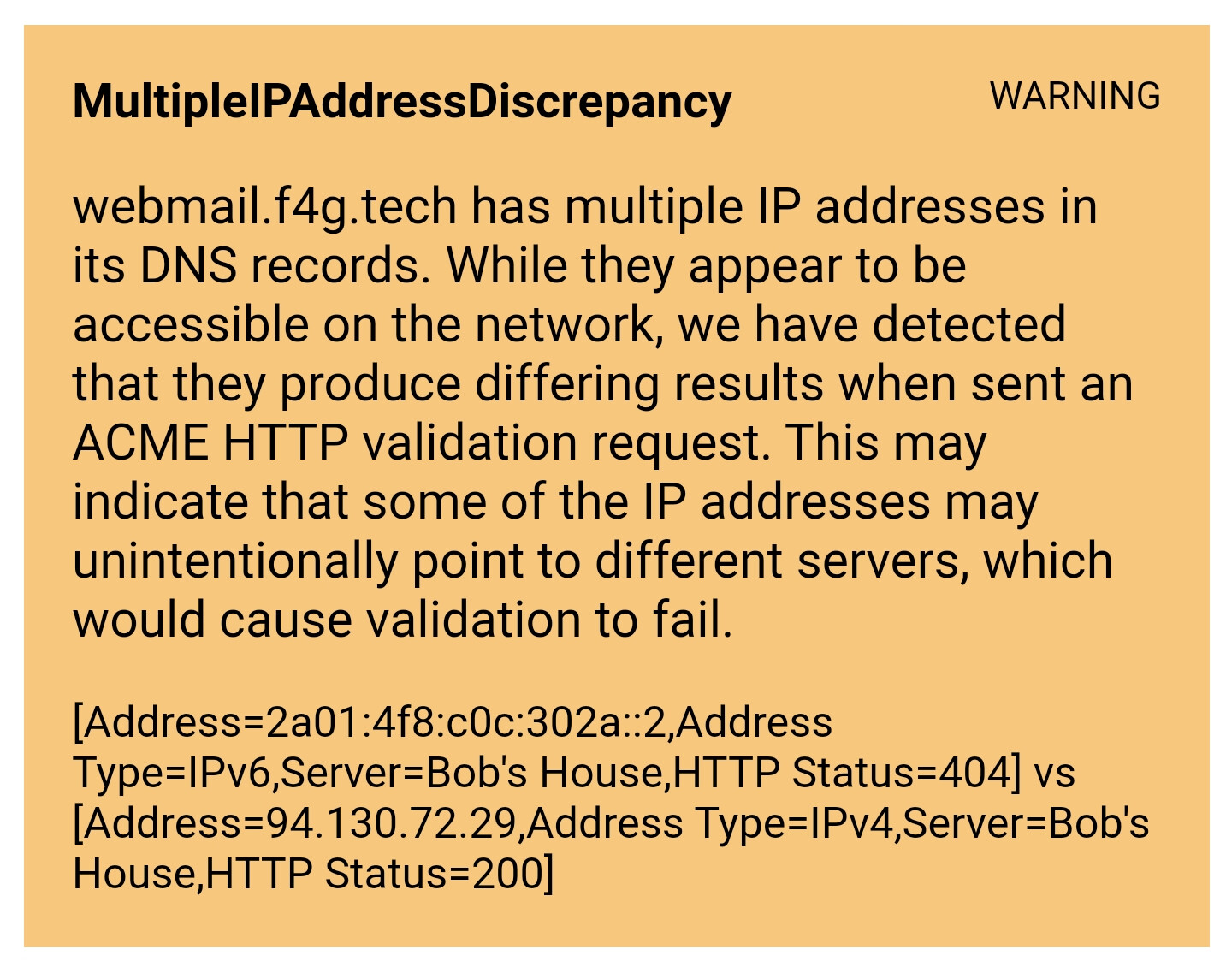
OK. I am still getting this for webmail.f4g.tech:

I am in Brazil. Let me try a VPN.
Contents of 1234 is abc
/var/www/_apps/roundcubemail-1.3.4/.well-known:
total 12
drwxr-xr-x  3 root     root     4096 Apr 19 21:12 .
drwxr-xr-x 14 www-data www-data 4096 Apr 19 21:12 ..
drwxr-xr-x  2 root     root     4096 Apr 19 21:24 acme-challenge

/var/www/_apps/roundcubemail-1.3.4/.well-known/acme-challenge:
total 12
drwxr-xr-x 2 root root 4096 Apr 19 21:24 .
drwxr-xr-x 3 root root 4096 Apr 19 21:12 ..
-rw-r--r-- 1 root root    4 Apr 19 21:24 1234
2 Likes
Let's try renaming 1234 to letsdebug-test
Let me know once it's done.
I think it's the IPv6 specific vHost that might be interfering.
2 Likes

I've checked incognito in chrome and get the same and the debug URL is not found here.....? Weird
Anyway, pls check debug link now.
We can ditch ip6.f4g.tech for now.
2 Likes
Bingo! 
Borked IPv6 strikes again!
2 Likes
Try removing your AAAA record then running this:
sudo certbot certonly --apache -d "webmail.f4g.tech" --dry-run
2 Likes
I'm out for lunch, but I'll check back as soon as I return. I suspect that with the removal of the AAAA record, everything I previously gave you will work beautifully. You really want to clean up your vHost configuration files in similar fashion to what I did with the one. Certbot will then create all of the correct port 443 configuration files and the correct redirects in the port 80 configuration files.
2 Likes
Enjoy your sandwich! 
I am wondering what if I would like to, or have to in the future, as we move over to ipv6, set this up as ipv6? Would I specify a ipv6 address in the vhconf file and disable DNS A record?
Alas, let's see this working first before I take such a leap 
Thanks for your help so far. Appreciated.
PS Disabling ipv6 on my network adaptor allowed me to see what you see in Chrome. Can we prevent certbot from using it?
3 Likes
I'm still out at lunch, but I wanted to say that your IPv6 address (AAAA record) itself is fine. It's that first vHost set to answer the IPv6 address specifically that was causing most of the issue. You should be able to simply disable that vHost for now instead of removing the IPv6 record and have things work correctly. Changing that vHost from IPv6:80 to *:80 should work too.
2 Likes
I'm back. I'm assuming things have moved forward smoothly.
2 Likes
sudo certbot certonly --apache -d "webmail.f4g.tech" --dry-run
IMPORTANT NOTES:
- The dry run was successful.
Can't run for real cos I exceeded my 5 tries quota - next week I think now 
OK, so some house cleaning to do by the looks of it. I remember I thought that certbot apache plugin had left my vhconf files rather 'untidy' - I wanted just one conf file where I could see everything in one edit/ view. Looks like I have to be careful where I step now that certbot has made itself resident in my conf files 
The ip6.f4g site was actually to force client browsers eg to load ipv6; part of a previous debugging session 
2 Likes
If your Apache configuration is such that you don't want certbot messing with it, you might be better off using its webroot plugin rather than its Apache plugin (assuming that you have Apache configured for each domain to have a directory path it can use for the .well-known directory).
3 Likes