I have NPM running on Dietpi. I have a domain atipv64.net. I released port 80 and 443 in my Fritzbox and entered the DynDNS server correctly. When I call up the IP of my Dietpi with port 80, I end up on the Fritzbox via my home network. I don't get a certificates created.
Test Results couchcloud.ipv64.de: There is a server found at this domain but it returned an unexpected status code Connection timed out.. Is it the NPM server? Please make sure your domain points to the IP where your NPM instance is running.
Let's Encrypt tries IPv6 first when an AAAA record exists. It also will try IPv4 if IPv6 times out. But, only for the first request. If you redirect the original HTTP challenge to HTTPS Let's Encrypt only uses IPv6 and will time out.
You are redirecting HTTP requests so the faulty AAAA record is likely causing this failure.
But, the HTTP Challenge is redirected to HTTPS and would timeout because of IPv6 failure.
Ignoring the IPv6 problem, IPv4 HTTP Challenge goes to HTTPS but that results in 404. They must have explicit config in their server to handle HTTP Challenge and not redirect it like their home page.
Request to: couchcloud.ipv64.de/188.194.135.124, Result: [Address=188.194.135.124,Address Type=IPv4,Server=openresty,HTTP Status=301,Number of Redirects=1,Final HTTP Status=404], Issue:
Trace:
@0ms: Making a request to http://couchcloud.ipv64.de/.well-known/acme-challenge/letsdebug-test (using initial IP 188.194.135.124)
@0ms: Dialing 188.194.135.124
@114ms: Server response: HTTP 301 Moved Permanently
@114ms: Received redirect to https://couchcloud.ipv64.de/.well-known/acme-challenge/letsdebug-test
@114ms: Dialing 188.194.135.124
@278ms: Server response: HTTP 404 Not Found
Hello exactly. I found out that there is a problem with IPv4 and IPv6 but I don't know. Is it possible that something is set incorrectly in my Fritzbox? Something was changed on IPv6.
I've been able to do a certificate anyway. However, this is treated as untrustworthy.
What information do you need to help?
Maybe but that is not something we normally help with. You should try your ISP or Fritzbox support to sort that.
I see you got a cert today for npm.couchcloud.ipv64.de and that is the cert used when making requests to couchcloud.ipv64.de. That is why it is "untrusted" because the domain names do not match. That is something wrong in your NPM setup and you would be best to ask them about that.
NPM is a configuration tool which is difficult to debug when things go wrong. Best place for advice is with NPM support or their community experts. We see NPM regularly so I say this from experience
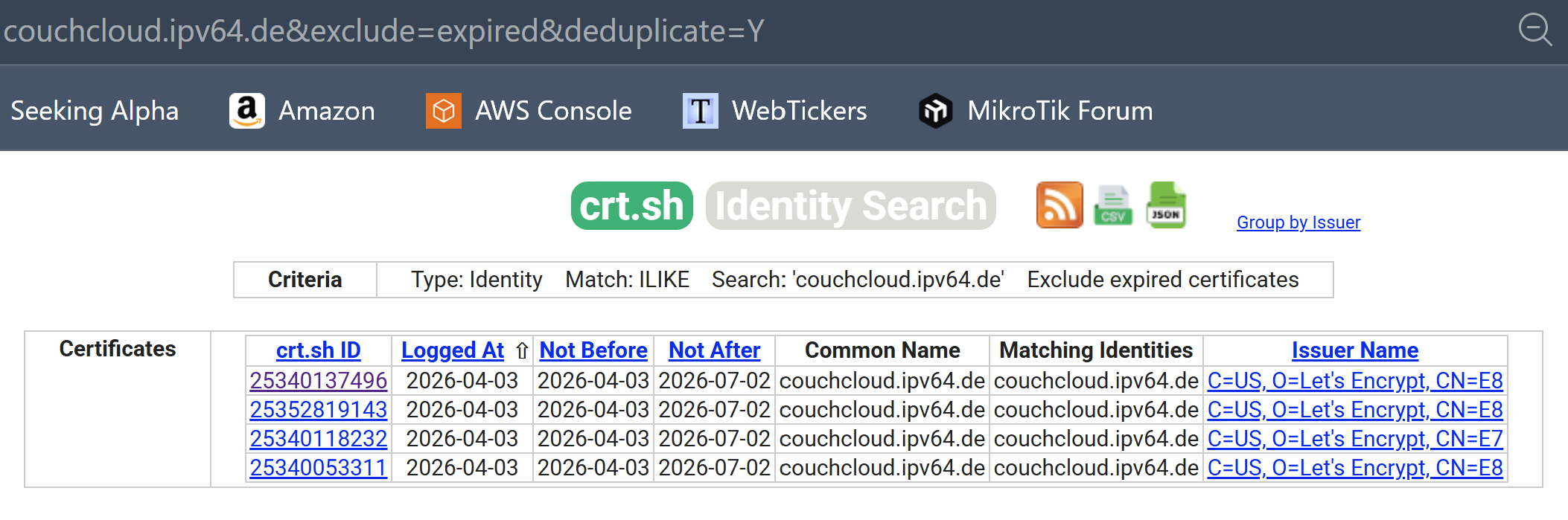
I also see you got 4 certificates for just couchcloud 2 days ago. You should be able to use one of these now. Again, the NPM experts should be able to explain what needs to be changed in their configuration.
I think there are so many problems here that I can forget the whole thing. I was just able to create new certificates again. Now it doesn't work again. I give up. Thank you
too many certificates (5) already issued for this exact set of identifiers in the last 168h0m0s, retry after 2026-04-06 18:24:09 UTC: see Rate Limits - Let's Encrypt
Ask for help or search for solutions at https://community.letsencrypt.org. See the logfile /data/logs/letsencrypt.log or re-run Certbot with -v for more details.
No, as has already been said getting certificates isn't your problem. Let's Encrypt needs to maintain records of the certificates they issue whether you use them or not, so they implement rate limits to help prevent abuse of their resources. There isn't any sort of "deleting" they're allowed to do now that the certificates are issued.
Hello again, I now understand why it didn't work well. Now I have the problem that the SSL connection is not classified as secure. can you help me with that?
I can help you with that by suggesting asking the NPM experts to sort out why it has not configured your system properly I may have mentioned this once or twice already.
 info Command: certbot certonly --config /etc/letsencrypt.ini --work-dir /tmp/letsencrypt-lib --logs-dir /data/logs --cert-name npm-46 --agree-tos --authenticator webroot -m abe-mk@web.de --preferred-challenges http --domains couchcloud.ipv64.de --key-type ecdsa
 warning Saving debug log to /data/logs/letsencrypt.log

 I give up. Thank you