I don't think so either. I just noticed a lot of weird backslashes in the latest version. Thought it was odd.
1 Like
Do you have multiple copies of Apache running?
If this was a residential setup it looks like your router's port forwarding (or NAT) is directing requests to a different Apache. And, probably a test one or something from long ago. As I noted earlier connections to your domain use a cert that expired in 2023. Also, the Apache that is replying is using a cert chain that has been wrong for a long time. And which does not appear in the Apache config file you posted at all.
It very much looks like multiple Apache servers here. Does this give you any ideas?
3 Likes
I was just trying to discern between copy-paste issues, forum weirdness, and actual file oddities. Don't mind me. I think @MikeMcQ has things well in hand. I just like to review things.
1 Like
no \* in original vhost file
1 Like
Further to my prior post about multiple Apache servers, can you check your public DNS
Please show output of this
curl -4 https://ifconfig.io
2 Likes
curl -4 https://ifconfig.io
70.89.220.117
From my prior post, do you have a router or similar kind of network routing device that might be sending requests to a different Apache server?
Because the kind of cert chain being actively used by those domains is not apparent in the config you are showing us.
Are you running any kind of VMs or containers or anything like that where multiple Apache instances are active?
2 Likes
Perhaps you should upload /opt/homebrew/etc/httpd/extra/httpd-vhosts.conf
You may need to copy it to a .txt file to use the upload option on the forum's upload button
Because here is more discrepancy which points to multiple Apache but the formatting issues makes it difficult to say how to fix this. The formatting (and my attempt to correct that) are at least making it difficult to see and we may be missing something important.
Note the DUMP_VHOSTS output below. It says walkershire starts on line 28 of that file. But, I don't see walkershire at all. Instead, the first VirtualHost I see is aimhighschools.com which the dump says should be much later in that file.
2 Likes
It may also be worth seeing what happens after you stop apache like you did earlier. Leave it stopped and see what response occurs for HTTP and HTTPS requests.
Use a tool like this to check some domains: https://letsdebug.net
If you still get replies that is positive indication of multiple Apache
2 Likes
httpd-vhosts_conf_txt.txt (16.8 KB)
1 Like
Cool. Will look again.
Any thoughts on the multiple Apache?
Did you try stopping it and seeing if something still replied?
2 Likes
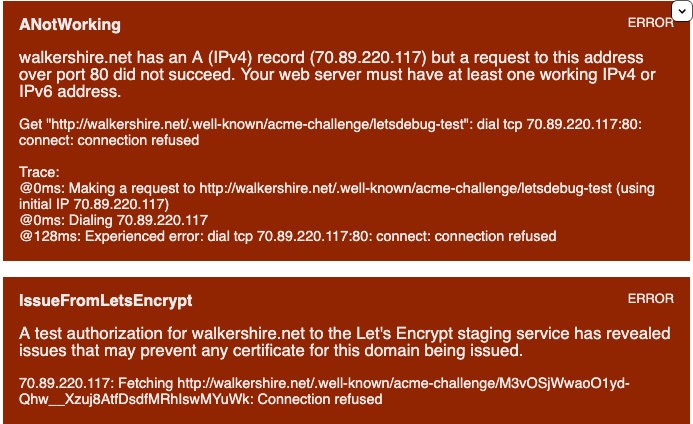
I did have the problem with multiple httpd running but after due to old versions of brew and certbot. I think I fixed them and moved the old copies of both to trash
Brew, httpd and certbot now show the correct -v
But, the config file you just uploaded does not have any ServerName or ServerAlias for walkershire
Yet, the DUMP_VHOSTS output you showed earlier did have one. There must be different Apache still running.
I don't know MacOS very well but perhaps the path is different depending on whether you use sudo or how exactly you start/ control Apache. This can happen on other o/s
Check for yourself. Line 28 from the file you just uploaded is not for walkershire
3 Likes
I am sorry. I had fixed both vhost and ssl but somehow they reverted, Now both should be correct.
httpd-vhost_conf_txt2.txt (16.7 KB)
I original tried to split the 19 domains on to 2 computers. One for WAN and other for LAN but with a unknown bad version of brew and multiple copies of httpd it really got messed up. So decided to revert to original migration to on the new computer which was still messed up. Many hours spent learning and fixing thanks to ChatCPT and Perplexity which found a lot of of errors but not all.  Thank You.
should I try to recreate the certificates now?
No, you showed perfectly good certs earlier. Getting them is not a problem.
You need to configure your system to use them.
Right now I can't connect with HTTP or HTTPS to walkershire.net
Are you saying that you now have a single Apache for all the domains? Or are you still splitting them. Because almost certainly something about that split was causing the earlier problem. I asked about multiple Apache quite a few posts ago 
2 Likes
All are now on one computer with one Apache. We will try to split them next year.