Please fill out the fields below so we can help you better. Note: you must provide your domain name to get help. Domain names for issued certificates are all made public in Certificate Transparency logs (e.g. crt.sh | example.com), so withholding your domain name here does not increase secrecy, but only makes it harder for us to provide help.
My domain is: mail.iob.co.bw
I ran this command:

It produced this output:
Starting Script run at 12/14/2023 11:56:57.
Get the MDaemon paths.
The MDaemon.ini Path is D:\MDaemon\App\MDaemon.ini.
The MDaemon APP Path is D:\MDaemon\App.
The MDaemon Pem path is D:\MDaemon\PEM.
The MDaemon Log path is D:\MDaemon\Logs.
The MDaemon RAW path is D:\MDaemon\Queues\Raw.
The WorldClient Path is D:\MDaemon\WorldClient.
The WorldClient HTML Path is D:\MDaemon\WorldClient\HTML.
The well-known path is D:\MDaemon\WorldClient\HTML.well-known.
The Acme-Challenge path is D:\MDaemon\WorldClient\HTML.well-known\Acme-challenge.
The State Path is D:\MDaemon\PEM_LEState.
The FQDN is set to mail.iob.co.bw.
The email address is set to postmaster@mail.iob.co.bw.
Setting the system to use the LetsEncrypt Live Service.
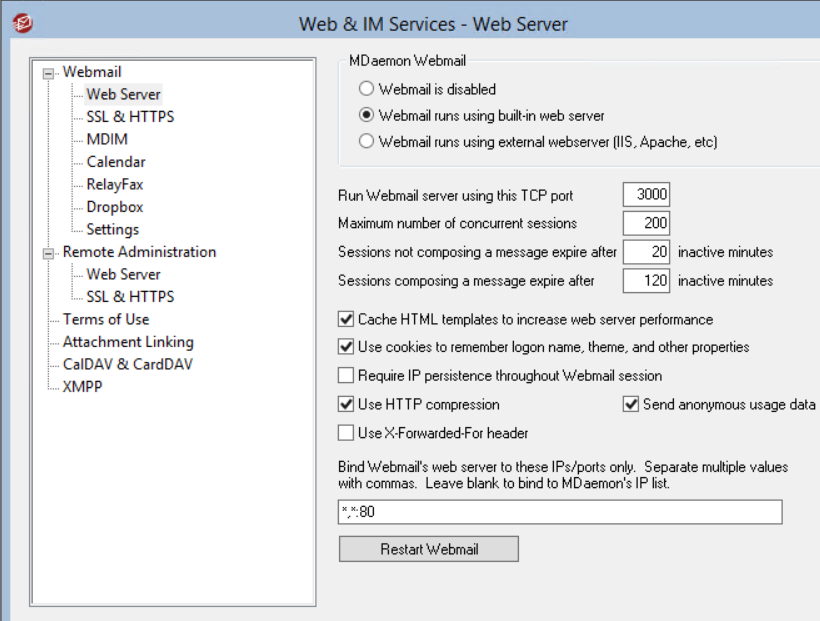
Error: WorldClient must be listening on port 80. This script will stop now.
This is a critical error, the script will now stop.
My web server is (include version):
MDaemon Webmail HTTP server: v20.0.4
The operating system my web server runs on is (include version):
Windows Server 2012 R2
My hosting provider, if applicable, is:
I can login to a root shell on my machine (yes or no, or I don't know):
Yes
I'm using a control panel to manage my site (no, or provide the name and version of the control panel):
No
The version of my client is (e.g. output of certbot --version or certbot-auto --version if you're using Certbot):