Please fill out the fields below so we can help you better. Note: you must provide your domain name to get help. Domain names for issued certificates are all made public in Certificate Transparency logs (e.g. crt.sh | example.com), so withholding your domain name here does not increase secrecy, but only makes it harder for us to provide help.
My domain is: lafamilleparfaite.com
I ran this command: curl -I http://lafamilleparfaite.com/.well-known/acme-challenge/test-file
It produced this output:challenge/test-file
HTTP/1.1 200 OK
Date: Wed, 08 Oct 2025 19:08:28 GMT
Server: Apache
Strict-Transport-Security: max-age=63072000
Upgrade: h2
Connection: Upgrade
Last-Modified: Wed, 08 Oct 2025 18:19:47 GMT
ETag: "5-640a9bac2ff63"
Accept-Ranges: bytes
Content-Length: 5
My web server is (include version): apache2 -v
Server version: Apache/2.4.65 (Debian)
The operating system my web server runs on is (include version): apache2 -v
Server version: Apache/2.4.65 (Debian)
My hosting provider, if applicable, is: Ionos.ca but DNSSEC to cloudflare 4 years ago with the help of ionos with a config on their side.
I can login to a root shell on my machine (yes or no, or I don't know): yes im full adm on everything in my network.
I'm using a control panel to manage my site (no, or provide the name and version of the control panel): no, ther a control panel for this?
The version of my client is (e.g. output of certbot --version or certbot-auto --version if you're using Certbot):
i asked chatgpt to resume my problem because im not good at writting in english.
I’m encountering issues with ACME HTTP-01 validation for my domain lafamilleparfaite.com. Here is the setup:
Setup Overview:
- Domain:
lafamilleparfaite.com - Cloudflare: DNS proxy not enabled for lafamilleparfaite.com but it need to be proxied for security.
- I used Nginx Proxy Manager to pull certificate and secure my little 3 server at home and my 2 private document files: reverse proxy managing multiple sites on the same server port 80 and 443
- OPNsense: firewall/router forwarding ports to local containers = 10.0.100.1/24 vlan 100
- WordPress: running in an LXC container behind Nginx Proxy Manager 10.0.50.40/24 vlan 50
Problem:
- When using Certbot with
--webrootfor HTTP-01 validation, the ACME challenge fails. - The challenge files are accessible locally on the server (
curlfrom localhost returns 200 OK), but public validation fails because Cloudflare intercepts requests to/.well-known/acme-challenge/. - I suspect that the combination of Cloudflare proxy, Nginx Proxy Manager, and OPNsense prevents Let’s Encrypt from reaching the challenge files. i even disable all port forwarded and let only port 80 to my lxc container 10.0.50.x and i can reach it all the time.
Attempted Setup:
- Certbot with
--webrootpointing to/var/www/wordpressor/var/www/letsencrypt - Trying to issue certificates for
lafamilleparfaite.comand subdomains
Request / Assistance Needed:
-
Guidance on the best method to issue a certificate in this setup. i want it automatically without worriying about it. i need dns only proxy from cloudflare for my main website
-
Would DNS-01 validation be recommended in this scenario to bypass HTTP proxy restrictions?
-
Any advice on configuring HTTP-01 behind Cloudflare + Nginx Proxy Manager + OPNsense to allow successful validation.
here some command ive done on the server and i think they work everywhere in the world if you try atm
root@lafamilleparfaite ~# curl -I http://lafamilleparfaite.com/.well-known/acme-challenge/test-file
HTTP/1.1 200 OK
Date: Wed, 08 Oct 2025 19:37:28 GMT
Server: Apache
Strict-Transport-Security: max-age=63072000
Upgrade: h2
Connection: Upgrade
Last-Modified: Wed, 08 Oct 2025 18:19:47 GMT
ETag: "5-640a9bac2ff63"
Accept-Ranges: bytes
Content-Length: 5

root@lafamilleparfaite ~# curl -I http://10.0.50.40/.well-known/acme-challenge/test-file
HTTP/1.1 200 OK
Date: Wed, 08 Oct 2025 19:37:46 GMT
Server: Apache
Strict-Transport-Security: max-age=63072000
Upgrade: h2
Connection: Upgrade
Last-Modified: Wed, 08 Oct 2025 18:19:47 GMT
ETag: "5-640a9bac2ff63"
Accept-Ranges: bytes
Content-Length: 5
then
}
2025-10-08 19:11:37,342:DEBUG:acme.client:Storing nonce: D3QZ_ywx_jBqsNPIkyHRb7HEcMa5Pj5R4JCzW2suwyBlrSgzQ5E
2025-10-08 19:11:37,342:INFO:certbot._internal.auth_handler:Challenge failed for domain acme.lafamilleparfaite.com
2025-10-08 19:11:37,342:INFO:certbot._internal.auth_handler:http-01 challenge for acme.lafamilleparfaite.com
2025-10-08 19:11:37,343:DEBUG:certbot._internal.display.obj:Notifying user:
Certbot failed to authenticate some domains (authenticator: webroot). The Certificate Authority reported these problems:
  Domain: acme.lafamilleparfaite.com
  Type:   unauthorized
  Detail: 198.168.101.172: Invalid response from http://acme.lafamilleparfaite.com/.well-known/acme-challenge/I9f8hj1G9e6eQwGH1PSqE5HFzY8v0XcImM7x4wAMWnA: 404

Hint: The Certificate Authority failed to download the temporary challenge files created by Certbot. Ensure that the listed domains serve their content from the provided --webroot-path/-w and that files created there can be downloaded from the internet.

2025-10-08 19:11:37,343:DEBUG:certbot._internal.error_handler:Encountered exception:
Traceback (most recent call last):
  File "/usr/lib/python3/dist-packages/certbot/_internal/auth_handler.py", line 106, in handle_authorizations
    self._poll_authorizations(authzrs, max_retries, best_effort)
  File "/usr/lib/python3/dist-packages/certbot/_internal/auth_handler.py", line 206, in _poll_authorizations
    raise errors.AuthorizationError('Some challenges have failed.')
certbot.errors.AuthorizationError: Some challenges have failed.

2025-10-08 19:11:37,344:DEBUG:certbot._internal.error_handler:Calling registered functions
2025-10-08 19:11:37,344:INFO:certbot._internal.auth_handler:Cleaning up challenges
2025-10-08 19:11:37,344:DEBUG:certbot._internal.plugins.webroot:Removing /var/www/letsencrypt/.well-known/acme-challenge/I9f8hj1G9e6eQwGH1PSqE5HFzY8v0XcImM7x4wAMWnA
2025-10-08 19:11:37,344:DEBUG:certbot._internal.plugins.webroot:All challenges cleaned up
2025-10-08 19:11:37,344:DEBUG:certbot._internal.log:Exiting abnormally:
Traceback (most recent call last):
  File "/usr/bin/certbot", line 33, in <module>
    sys.exit(load_entry_point('certbot==2.1.0', 'console_scripts', 'certbot')())
             ^^^^^^^^^^^^^^^^^^^^^^^^^^^^^^^^^^^^^^^^^^^^^^^^^^^^^^^^^^^^^^^^^^
  File "/usr/lib/python3/dist-packages/certbot/main.py", line 19, in main
    return internal_main.main(cli_args)
           ^^^^^^^^^^^^^^^^^^^^^^^^^^^^
  File "/usr/lib/python3/dist-packages/certbot/_internal/main.py", line 1736, in main
    return config.func(config, plugins)
           ^^^^^^^^^^^^^^^^^^^^^^^^^^^^
  File "/usr/lib/python3/dist-packages/certbot/_internal/main.py", line 1590, in certonly
    lineage = _get_and_save_cert(le_client, config, domains, certname, lineage)
              ^^^^^^^^^^^^^^^^^^^^^^^^^^^^^^^^^^^^^^^^^^^^^^^^^^^^^^^^^^^^^^^^^
  File "/usr/lib/python3/dist-packages/certbot/_internal/main.py", line 138, in _get_and_save_cert
    lineage = le_client.obtain_and_enroll_certificate(domains, certname)
              ^^^^^^^^^^^^^^^^^^^^^^^^^^^^^^^^^^^^^^^^^^^^^^^^^^^^^^^^^^
  File "/usr/lib/python3/dist-packages/certbot/_internal/client.py", line 516, in obtain_and_enroll_certificate
    cert, chain, key, _ = self.obtain_certificate(domains)
                          ^^^^^^^^^^^^^^^^^^^^^^^^^^^^^^^^
  File "/usr/lib/python3/dist-packages/certbot/_internal/client.py", line 428, in obtain_certificate
    orderr = self._get_order_and_authorizations(csr.data, self.config.allow_subset_of_names)
             ^^^^^^^^^^^^^^^^^^^^^^^^^^^^^^^^^^^^^^^^^^^^^^^^^^^^^^^^^^^^^^^^^^^^^^^^^^^^^^^
  File "/usr/lib/python3/dist-packages/certbot/_internal/client.py", line 496, in _get_order_and_authorizations
    authzr = self.auth_handler.handle_authorizations(orderr, self.config, best_effort)
             ^^^^^^^^^^^^^^^^^^^^^^^^^^^^^^^^^^^^^^^^^^^^^^^^^^^^^^^^^^^^^^^^^^^^^^^^^
  File "/usr/lib/python3/dist-packages/certbot/_internal/auth_handler.py", line 106, in handle_authorizations
    self._poll_authorizations(authzrs, max_retries, best_effort)
  File "/usr/lib/python3/dist-packages/certbot/_internal/auth_handler.py", line 206, in _poll_authorizations
    raise errors.AuthorizationError('Some challenges have failed.')
certbot.errors.AuthorizationError: Some challenges have failed.
2025-10-08 19:11:37,346:ERROR:certbot._internal.log:Some challenges have failed.
my goal was to just let every server created under my specific vlan 50 to receive '' automatic '' lets encrypt cert.
I explain myself: i've got busted by letting bad security over the internet and letting random people access my webmail and i've got infected by a bot that steal all my password or whatever it was. i still suffer from this, since one of my email is getting 24/7 accessing my email server over and over even after 3 years.
here my nat:
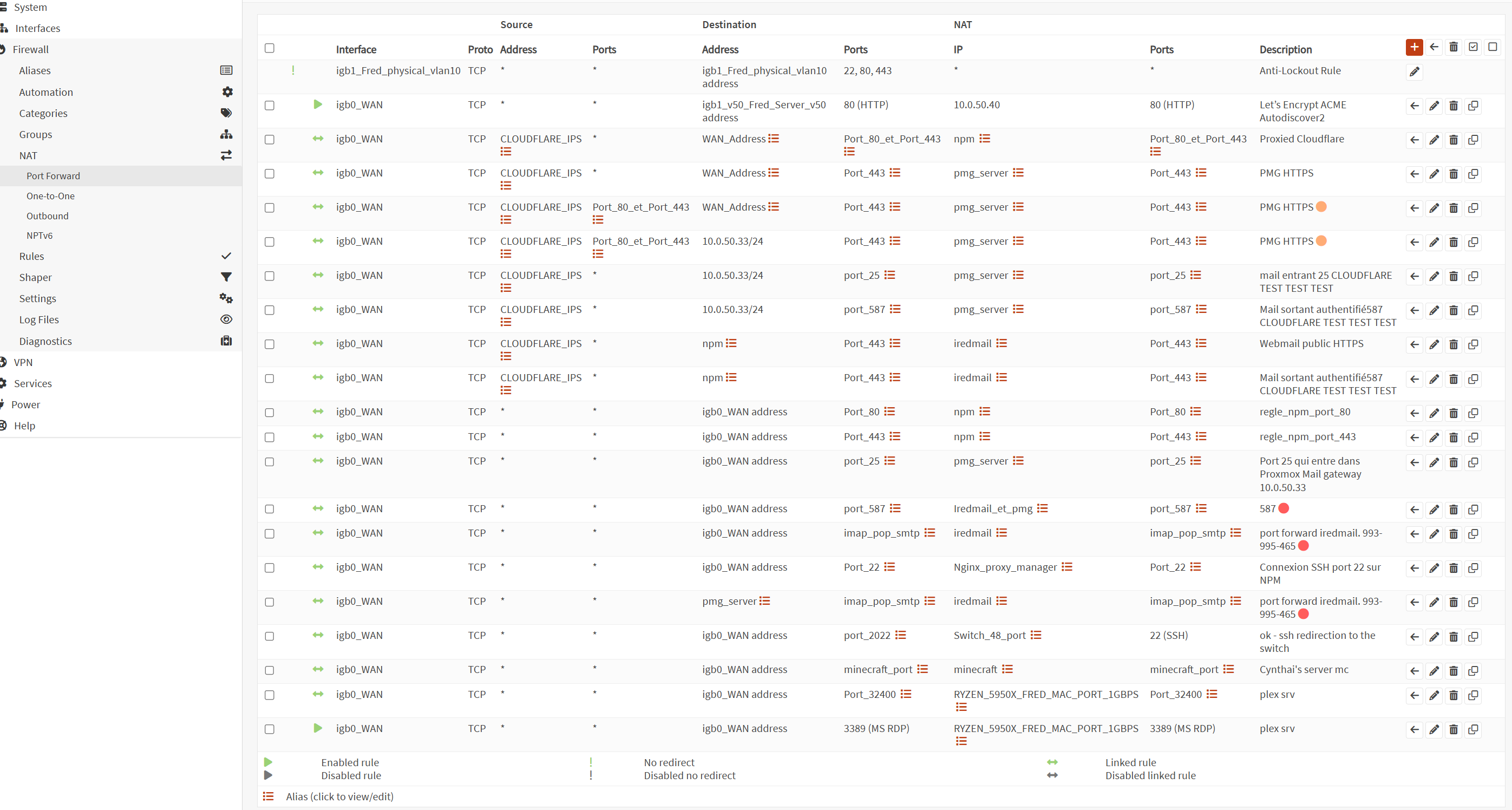
here my opnsense rules.

here my vlan 50

cloudflare:

My son is in vlan 60 and there no sécurity involved for his domain, that why i've created vlan to separate his stuff from mine and block everything that could access my network.
He doesn't mind about security at all. i do and im not quite sure how to fix this Im open to everything that doesn't cost anything so far to host a simple 3 page website properly without getting attacked or going down once again.
Best practice to have every server secure and let cloudflare manage my main domain lafamilleparfaite.com
Im so lost lol
Also go easy on me im not guru of networking and security
Sorry main language is french
yes chatgpt help me resume my problem because im not goot at explaining.
wish you understand my little goal. either npm will assigne cert or retrieve via http by himself with my lxc template ex: subdomain.lafamilleparfaite.com
I will replicate this to my other domain too lafamilleparfaite.ca after if everything goes well.
Can you point me in the good direction?
chatgpt say i need to removed proxied lafamilleparfaite.com and after it success with the challenge, i can put it back on on cloudflare. real or not at all or im doing all this wrongly.
oh yeeah under full strict security from cloudflare, i had to create a certificate and i've got it. I just dont know what to do with this one ive got from

thanks for all.