Tengo un VPS ubuntu 18.04 en el que tengo un proyecto en Django 2 con python 3.6, el cual fue lanzado en enero de 2021 con su certificado SSL creado con certbot-auto y con auto-renovación a través de un crontab. Todo funcionó bien hasta el 28 de septiembre de 2021, el certificado no se renovó y cuando intento hacerlo, recibo un mensaje de que certbot-auto ahora está obsoleto. Sigo las recomendaciones del enlace Certbot - Ubuntubionic Apache Desinstalé el certbot-auto y al ingresar cualquiera de los comandos sudo certbot --apache o sudo certbot certonly --apache y luego ingresar el correo, me aparece el siguiente mensaje:
An unexpected error occurred:
requests.exceptions.ConnectionError: HTTPSConnectionPool(host='acme-v02.api.letsencrypt.org', port=4 43): Max retries exceeded with url: /directory (Caused by NewConnectionError('<urllib3.connection.HT TPSConnection object at 0x7f5679da1af0>: Failed to establish a new connection: [Errno -2] Name or se rvice not known'))
Ask for help or search for solutions at https://community.letsencrypt.org. See the logfile /var/log/ letsencrypt/letsencrypt.log or re-run Certbot with -v for more details.
Saludos, si tiene acceso a internet, pero no estoy seguro si tiene algún firewall, debería tener, ya que soy un programador externo y me dieron acceso a uno de sus servidores.
I have a Ubuntu 18.04 VPS in which I have a project in Django 2 with python 3.6, which was released in January 2021 with its SSL certificate created with certbot-auto and with auto-renewal through a crontab. Everything worked fine until Sep 28, 2021, the certificate was not renewed and when I try to do so I get a message that certbot-auto is now out of date. I follow the recommendations of the link Certbot - Ubuntubionic Apache I uninstalled the certbot-auto and entering any of the commands ** sudo certbot --apache ** or ** sudo certbot certonly - -apache ** and then enter the mail, the following message appears:
An unexpected error occurred:
requests.exceptions.ConnectionError: HTTPSConnectionPool(host='acme-v02.api.letsencrypt.org', port=4 43): Max retries exceeded with url: /directory (Caused by NewConnectionError('<urllib3.connection.HT TPSConnection object at 0x7f5679da1af0>: Failed to establish a new connection: [Errno -2] Name or se rvice not known'))
Ask for help or search for solutions at https://community.letsencrypt.org. See the logfile /var/log/ letsencrypt/letsencrypt.log or re-run Certbot with -v for more details.
I appreciate your comments and help in advance. Greetings.
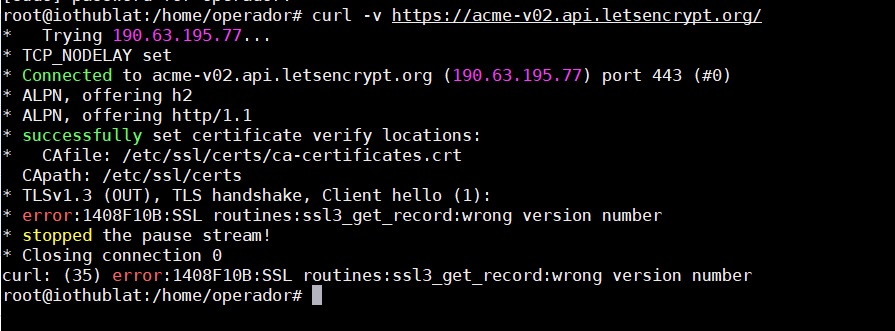
As a test, can you please try: curl -I http://acme-v02.api.letsencrypt.org/directory wget --delete-after https://acme-v02.api.letsencrypt.org/directory
and show the output of: openssl version certbot --version
Thank you very much for your help, I did what you mention but when installing step 7, I get the following error:
root@iothublat:/usr/local/bin# sudo certbot --apache
Saving debug log to /var/log/letsencrypt/letsencrypt.log
Enter email address (used for urgent renewal and security notices)
(Enter 'c' to cancel): soporte@javiercb.com
An unexpected error occurred:
requests.exceptions.SSLError: HTTPSConnectionPool(host='acme-v02.api.letsencrypt.org', port=443): Max retries exceeded with url: /directory (Caused by SSLError(SSLError(1, '[SSL: WRONG_VERSION_NUMBER] wrong version number (_ssl.c:1131)')))
Ask for help or search for solutions at https://community.letsencrypt.org. See the logfile /var/log/letsencrypt/letsencrypt.log or re-run Certbot with -v for more details.
But when trying to install again:
root@iothublat:/# sudo certbot --apache
Saving debug log to /var/log/letsencrypt/letsencrypt.log
Enter email address (used for urgent renewal and security notices)
(Enter 'c' to cancel): soporte@javiercb.com
An unexpected error occurred:
requests.exceptions.SSLError: HTTPSConnectionPool(host='acme-v02.api.letsencrypt.org', port=443): Max retries exceeded with url: /directory (Caused by SSLError(SSLError(1, '[SSL: WRONG_VERSION_NUMBER] wrong version number (_ssl.c:1131)')))
Ask for help or search for solutions at https://community.letsencrypt.org. See the logfile /var/log/letsencrypt/letsencrypt.log or re-run Certbot with -v for more details.
Thanks for answering, I tell you that I only have access to the VPS console, I do not control anything else, so I know little about this, I would like to know if I can do something from the VPS, or it is already an external one that I have control over, for example, some configuration in the domain and I do not control it?