405 Not Allowed returned on order finalize

My domain is: (I have a bunch of them) but one not working is: santamoses.com. the other one that somehow managed to update is buy.ontariospeeddating.ca

I ran this command:

sh /root/.acme.sh/acme.sh --no-color --force --issue -d santamoses.com -d buy.ontariospeeddating.ca --stateless --insecure --server letsencrypt

It produced this output: (see below)

My web server is (include version): apache

The operating system my web server runs on is (include version): centOS6

My hosting provider, if applicable, is:

I can login to a root shell on my machine (yes or no, or I don't know): yes

I'm using a control panel to manage my site (no, or provide the name and version of the control panel): no

The version of my client is (e.g. output of certbot --version or certbot-auto --version if you're using Certbot): latest acme.sh downloaded today from the acme.sh website

The script manages to verify my keys so HTTP-01 validation passed for all my domains, but when I get to the finalization stage, I get a weird HTTP 405 error (not allowed). 405 should mean "method not allowed" where as 403 should mean "Not allowed access".

anyways, here's the relevant portion of the log....

[Sun Oct  5 00:51:54 EDT 2025] =======Sending Signed Request=======
[Sun Oct  5 00:51:54 EDT 2025] url='https://acme-v02.api.letsencrypt.org/acme/finalize/2703843311/434901303551'
[Sun Oct  5 00:51:54 EDT 2025] payload='{"csr":(redacted)}'
[Sun Oct  5 00:51:54 EDT 2025] Use cached jwk for file: /root/.acme.sh/ca/acme-v02.api.letsencrypt.org/directory/account.key
[Sun Oct  5 00:51:54 EDT 2025] Use _CACHED_NONCE='(redacted)'
[Sun Oct  5 00:51:54 EDT 2025] nonce='(redacted)'
[Sun Oct  5 00:51:55 EDT 2025] POST
[Sun Oct  5 00:51:55 EDT 2025] _post_url='https://acme-v02.api.letsencrypt.org/acme/finalize/2703843311/434901303551'
[Sun Oct  5 00:51:55 EDT 2025] body='{"protected":(redacted), "payload": (redacted), "signature": (redacted)}'
[Sun Oct  5 00:51:55 EDT 2025] _postContentType='application/jose+json'
[Sun Oct  5 00:51:55 EDT 2025] Http already initialized.
[Sun Oct  5 00:51:55 EDT 2025] _CURL='curl --silent --dump-header /root/.acme.sh/http.header  -L  -g  --insecure  '
[Sun Oct  5 00:52:31 EDT 2025] _ret='0'
[Sun Oct  5 00:52:31 EDT 2025] responseHeaders='HTTP/1.1 100 Continue

HTTP/1.1 405 Not Allowed
Server: nginx
Date: Sun, 05 Oct 2025 04:52:30 GMT
Content-Type: text/html
Content-Length: 150
Connection: keep-alive

'
[Sun Oct  5 00:52:31 EDT 2025] code='405'
[Sun Oct  5 00:52:31 EDT 2025] original='<html>
<head><title>405 Not Allowed</title></head>
<body>
<center><h1>405 Not Allowed</h1></center>
<hr><center>nginx</center>
</body>
</html>
'
[Sun Oct  5 00:52:31 EDT 2025] response='<html>
<head><title>405 Not Allowed</title></head>
<body>
<center><h1>405 Not Allowed</h1></center>
<hr><center>nginx</center>
</body>
</html>
'
[Sun Oct  5 00:52:31 EDT 2025] Signing failed. Finalize code was not 200.
[Sun Oct  5 00:52:31 EDT 2025] <html>
<head><title>405 Not Allowed</title></head>
<body>
<center><h1>405 Not Allowed</h1></center>
<hr><center>nginx</center>
</body>
</html>
[Sun Oct  5 00:52:31 EDT 2025] _on_issue_err
[Sun Oct  5 00:52:31 EDT 2025] Please check log file for more details: /root/.acme.sh/acme.sh.log
[Sun Oct  5 00:52:31 EDT 2025] _chk_vlist

Is there something I can do in the meantime to fix this?
I tried updating with acme.sh --update but I'm told its updated. then I tried --debug 3 switch and it did not help.
A few things I've noticed:

  • Why are you using --force? This does not magically make an error go away. Please don't use that;
  • Why are you using --insecure? That sounds like a bad plan or your system isn't set up properly to recognise the Let's Encrypt root as trusted.
  • Your CLI command requests a certificate for just 2 hostnames. But the order — which indeed has the status "ready", so all authorizations are indeed valid — lists a whopping 10 hostnames (3 domains with a variety of subdomains)? Not sure if actually relevant, but it struck me as weird. Also, I don't know if an incorrect CSR for example would result in this 405 error..
5 Likes

CentOS 6 is quiet old. I am not sure it has even the Letsencrytp's default root certificate "ISRG Root X1" in its trust anchor store.

6 Likes

Yeah, all the auths in the order are valid but santamoses.com is not in that order at all.

Beyond that problem, the DNS for santamoses is very different than the other domains and has delegation problems. @mik3ca See: santamoses.com | DNSViz These can easily interfere with a successful challenge.

I also see inability to connect to your clubcatcher DNS server using UDP. You should look at that too. That affects your other domain(s) (and probably santamoses once you fix that). Using a single IP for both DNS servers doesn't provide robustness either. See: buy.ontariospeeddating.ca | DNSViz

You need to fix your DNS delegations and figure out why the order did not include santamoses. I'm assuming you just omitted those other domains from your example command as the only certs I see have the larger set of domain names.

5 Likes

I and one other person has access to the backend, but the physical computer location is an 8 hour drive away. We're not upgrading the OS because that may cause alot of data and our optimal configuration to be lost.

I use acme.sh for certs.

I wonder if by DNS delegation you mean I can't register new domains for HTTPS until I enable UDP port 53.

Several months ago I was tightening my server so that might be something.

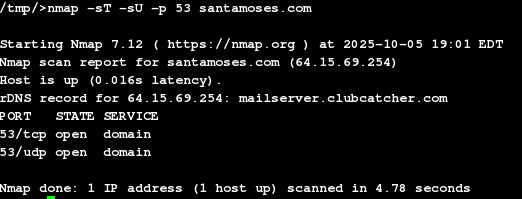
I ran a test on the unregistered domain and nmap tells me the TCP and UDP port are open.

Is there a specific IP I should whitelist in my firewall for letsencrypt to function normally?

Did you look at the DNSViz report for santamoses: santamoses.com | DNSViz

Look especially at the Warning messages about the mis-matched name servers

I assume you intend the DNS to be configured in a similar way as your other domains. This is a good place to start in fixing your problem.

Let's Encrypt walks the authoritative DNS tree so any path that is configured must produce the right result

I am not sure that is the whole problem here but it is one you should fix.

6 Likes

This looks to me like a reply from the Let's Encrypt API, not your server? Am I reading that wrong? Renew or issue failed with curl _ret='139' · Issue #4892 · acmesh-official/acme.sh · GitHub suggests the same. Could this just be a really old acme.sh that tries something no longer supported by the API?

4 Likes

OP claims:

But perhaps good to double check..

5 Likes

I talked to the server co-owner and he's no longer using santamoses.com. Now he is using santarealbeard.com and claims he has updated his nameserver settings at the registrar earlier today but due to DNS propogation I'm guessing I'll need to wait 48 hours for the changes to take effect.

I checked the version of acme.sh that I downloaded today with the --version flag and it reports v3.1.2

The DNSViz test for santarealbeard has the same problems as the other santa.

See especially the Warnings section: santarealbeard.com | DNSViz

Ask them about

santarealbeard.com.	172800	IN	NS	dns1.eyeonkate.com.nolongeruseddomain.com.
santarealbeard.com.	172800	IN	NS	dns2.eyeonkate.com.nolongeruseddomain.com.
6 Likes

Backup your data. Upgrade your OS ... Check your data... If required restore your data.

Again ... Backup your data.

@Osiris is correct. "force" ?? Almost NEVER required. (even with acme.sh)
Best Practice: Update daily -- even multiple times a day with cron...
My 2 cents. ¢

5 Likes

This topic was automatically closed 30 days after the last reply. New replies are no longer allowed.