cool.
Then you should google for “how to deploy ssl certificate on apache”.
cool.
Then you should google for “how to deploy ssl certificate on apache”.
I’m not sure why your apache is currently serving anything via HTTPS. Based on your last httpd -S output, there’s no VirtualHost listening on :443. Did anything change about your vhost configuration in the meantime?
Curious about the output of httpd -S and grep -r "VirtualHost" /etc/httpd/.
" ‘cert success’ " only means the certificate is successfully issued.
You must know how to deploy this cert to your apache server.
If it is possible, please PM your domain name and your httpd.conf. I’d like to take a look.
Here’s the outcome :
 $ httpd -S and grep -r "VirtualHost" /etc/httpd/
    Usage: httpd [-D name] [-d directory] [-f file]
                 [-C "directive"] [-c "directive"]
                 [-k start|restart|graceful|graceful-stop|stop]
                 [-v] [-V] [-h] [-l] [-L] [-t] [-S]
    Options:
      -D name            : define a name for use in <IfDefine name> directives
      -d directory       : specify an alternate initial ServerRoot
      -f file            : specify an alternate ServerConfigFile
      -C "directive"     : process directive before reading config files
      -c "directive"     : process directive after reading config files
      -e level           : show startup errors of level (see LogLevel)
      -E file            : log startup errors to file
      -v                 : show version number
      -V                 : show compile settings
      -h                 : list available command line options (this page)
      -l                 : list compiled in modules
      -L                 : list available configuration directives
      -t -D DUMP_VHOSTS  : show parsed settings (currently only vhost settings)
      -S                 : a synonym for -t -D DUMP_VHOSTS
      -t -D DUMP_MODULES : show all loaded modules
      -M                 : a synonym for -t -D DUMP_MODULES
-t : run syntax check for config filesThose are separate commands, i.e.:
httpd -S
and
grep -r "VirtualHost" /etc/httpd/
Oops Sorry ! :3
Here you go with the result of the first query –
VirtualHost configuration: wildcard NameVirtualHosts and _default_ servers: *:443 is a NameVirtualHost default server lixxxx-251.members.linode.com (/etc/httpd/conf.d/ssl.con f:74) port 443 namevhost lixxxx-251.members.linode.com (/etc/httpd/conf.d/ssl .conf:74) *:80 is a NameVirtualHost default server www.mydomain.com (/etc/httpd/conf.d/domain1.conf:3) port 80 namevhost www.mydomain.com (/etc/httpd/conf.d/domain1.conf :3) alias mydomain.com Syntax OK
And Here’s The Result For the 2nd one !
/etc/httpd/conf/httpd.conf:# ports, in addition to the default. See also the <VirtualHost> /etc/httpd/conf/httpd.conf:# <VirtualHost> definition. These values also provide defaults for /etc/httpd/conf/httpd.conf:# any <VirtualHost> containers you may define later in the file. /etc/httpd/conf/httpd.conf:# All of these directives may appear inside <VirtualHost> containers, /etc/httpd/conf/httpd.conf:# If you do not specify an ErrorLog directive within a <VirtualHost> /etc/httpd/conf/httpd.conf:# logged here. If you *do* define an error logfile for a <VirtualHost> /etc/httpd/conf/httpd.conf:# If you do not define any access logfiles within a <VirtualHost> /etc/httpd/conf/httpd.conf:# define per-<VirtualHost> access logfiles, transactions will be /etc/httpd/conf/httpd.conf:# copying them to /your/include/path/, even on a per-VirtualHost basis. /etc/httpd/conf/httpd.conf:# VirtualHost: If you want to maintain multiple domains/hostnames on your /etc/httpd/conf/httpd.conf:# machine you can setup VirtualHost containers for them. Most configurations /etc/httpd/conf/httpd.conf:#NameVirtualHost *:80 /etc/httpd/conf/httpd.conf:# NOTE: NameVirtualHost cannot be used without a port specifier /etc/httpd/conf/httpd.conf:# VirtualHost example: /etc/httpd/conf/httpd.conf:# Almost any Apache directive may go into a VirtualHost container. /etc/httpd/conf/httpd.conf:# The first VirtualHost section is used for requests without a known /etc/httpd/conf/httpd.conf:#<VirtualHost *:80> /etc/httpd/conf/httpd.conf:#</VirtualHost> /etc/httpd/conf/httpd.conf:NameVirtualHost *:443 /etc/httpd/conf.d/ssl.conf:<VirtualHost _default_:443> /etc/httpd/conf.d/ssl.conf:</VirtualHost> /etc/httpd/conf.d/domain1-le-ssl.conf:NameVirtualHost *:80 /etc/httpd/conf.d/domain1-le-ssl.conf:<VirtualHost *:443> /etc/httpd/conf.d/domain1-le-ssl.conf:</VirtualHost> /etc/httpd/conf.d/domain1.conf:NameVirtualHost *:80 /etc/httpd/conf.d/domain1.conf:<VirtualHost *:80> /etc/httpd/conf.d/domain1.conf:</VirtualHost>
Hope That’s what you want !
It seems the client successfully ran at one point and created /etc/httpd/conf.d/domain1-le-ssl.conf.
There’s another file with a SSL vhost, /etc/httpd/conf.d/ssl.conf. Can you try removing everything between <VirtualHost> and </VirtualHost> in that file (including the <VirtualHost> tags themselves), then restart apache and see if the correct page gets served via HTTPS?
Okay So I’ve removed everything between
<VirtualHost _default_:443>
till </VirtualHost> in the /etc/httpd/conf.d/ssl.conf
Now Restarted - while executing service httpd restart I’ve got a warning
[warn] NameVirtualHost *:443 has no VirtualHosts
Now, What I was supposed to do next ?!
Edit :
When I go to www.mydomain.com it redirects me to https://www.mydomain.com as it should…
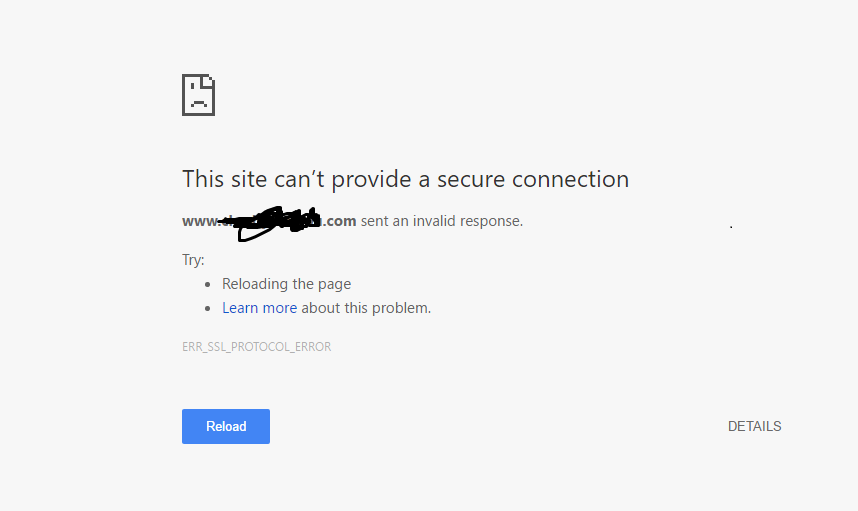
But I Gives me This 
Damnit !
You’re somehow serving HTTP on the HTTPS port now. What are the contents of /etc/httpd/conf.d/domain1-le-ssl.conf?
Here You Go
<IfModule mod_ssl.c>
NameVirtualHost *:80

<VirtualHost *:443>
    ServerAdmin webmaster@mydomain.com
    DocumentRoot /var/www/mydomain.com/public_html
    ServerName www.mydomain.com
    ServerAlias mydomain.com
    ErrorLog /var/www/mydomain.com/error.log
    CustomLog /var/www/mydomain.com/requests.log common
SSLCertificateFile /etc/letsencrypt/live/mydomain.com/cert.pem
SSLCertificateKeyFile /etc/letsencrypt/live/mydomain.com/privkey.pem
Include /etc/letsencrypt/options-ssl-apache.conf
SSLCertificateChainFile /etc/letsencrypt/live/mydomain.com/chain.pem
</VirtualHost>
</IfModule>Try adding SSLEngine on anywhere inside of the <VirtualHost> tag and restart apache afterwards.
(That NameVirtualHost *:80 doesn’t seem like it belongs there either, but it might not matter, so let’s see if it works without touching that.)
Do You Meant Something like that ?
<IfModule mod_ssl.c>
NameVirtualHost *:80

<VirtualHost *:443>
    ServerAdmin webmaster@mydomain.com
    DocumentRoot /var/www/mydomain.com/public_html
    ServerName www.mydomain.com
    ServerAlias mydomain.com
    ErrorLog /var/www/mydomain.com/error.log
    CustomLog /var/www/mydomain.com/requests.log common
SSLCertificateFile /etc/letsencrypt/live/mydomain.com/cert.pem
SSLCertificateKeyFile /etc/letsencrypt/live/mydomain.com/privkey.pem
Include /etc/letsencrypt/options-ssl-apache.conf
SSLCertificateChainFile /etc/letsencrypt/live/mydomain.com/chain.pem

SSLEngine on
</VirtualHost>
</IfModule>
Am I right ?!
That’s what I meant, yes. Re-reading this, though, I remembered that SSLEngine on is already set via Include /etc/letsencrypt/options-ssl-apache.conf, so that’s probably not going to help. (Might be worth checking out just in case - the file should look roughly like this: https://github.com/certbot/certbot/blob/master/certbot-apache/certbot_apache/options-ssl-apache.conf)
Let’s try some other things and see if it helps:
NameVirtualHost *:443 line in /etc/httpd/conf/httpd.conf. Not sure how it got there, but that doesn’t seem right - try removing that lineNameVirtualHost *:80 in `` to NameVirtualHost *:443
Does that fix anything after restarting apache?
If it doesn’t work, I’m yet again curious about the output of httpd -S. 
So Yea - SSLEngine on didn't worked ! ~ So I just removed SSLEngine on line from /etc/httpd/conf.d/domain1-le-ssl.conf
Of course I didn't get it !
Next,
Removed NameVirtualHost *:443 from /etc/httpd/conf/httpd.conf
Didn't get you in this part too !
Did u meant NameVirtualHost *:80 at /etc/httpd/conf/httpd.conf ?
Btw, NameVirtualHost at /etc/httpd/conf/httpd.conf is a commented (#) line..!
Lol that smiley made my day 
The contents of /etc/letsencrypt/options-ssl-apache.conf should roughly match https://github.com/certbot/certbot/blob/master/certbot-apache/certbot_apache/options-ssl-apache.conf
Based on your earlier grep output, there's a NameVirtualHost *:443 in /etc/httpd/conf/httpd.conf (no comment in front of it). Try removing that line.
NameVirtualHost *:80 in /etc/httpd/conf.d/domain1-le-ssl.conf. Replace that with NameVirtualHost *:443.Then, continue here:
Yep - they are matching except this line is missing in mine SSLCompression off
Done
Done !
Executing service httpd restart and...... The warning's gone !
Now going to www.mydomain.com
Same Error !
It still appears to be serving HTTP on port 443. I don’t see any remaining issues with the files you’ve provided so far, so I’m pretty much out of ideas. If you’d like, you could upload your /etc/httpd directory (as a .tar or .zip file or something like that) and send it to me privately so I can inspect the remaining files for anything that could be causing this.
Hello @pfg As you told - I’ve Pm’ed you my etc/httpd folder to you…
Please check out asap
I’ve reviewed the configuration and seem to have gotten SSL working by removing the <IfModule mod_ssl.c> and </IfModule> lines in /etc/httpd/conf.d/domain1-le-ssl.conf.
I’m not 100% certain, but I think this might be due to the fact that mod_ssl is enabled through /etc/httpd/conf.d/ssl.conf, which might not included before /etc/httpd/conf.d/domain1-le-ssl.conf, so when apache evaluates that file, mod_ssl might not be loaded yet. Either way, this seems to make it work.