# Cert Renew Fail
**URL:** https://community.letsencrypt.org/t/cert-renew-fail/143347
**Category:** Help
**Created:** [January 22, 2021, 12:11am UTC](https://community.letsencrypt.org/t/cert-renew-fail/143347 "2021-01-22T00:11:43Z")
**Posts on this page:** 20
**Page:** 1
### Author:  [@z929669](https://community.letsencrypt.org/u/z929669)
#### Post date: [January 22, 2021, 12:11am UTC](https://community.letsencrypt.org/t/cert-renew-fail/143347/1 "2021-01-22T00:11:44Z")
Please fill out the fields below so we can help you better. Note: you must provide your domain name to get help. Domain names for issued certificates are all made public in Certificate Transparency logs (e.g. [https://crt.sh/?q=example.com](https://crt.sh/?q=example.com)), so withholding your domain name here does not increase secrecy, but only makes it harder for us to provide help.
My domain is: [stepmodifications.org](http://stepmodifications.org)
I ran this command: certbot renew --dry-run
It produced this output:
IMPORTANT NOTES:
- The following errors were reported by the server:
- The following errors were reported by the server:
My web server is (include version): nginx 1.19.6
The operating system my web server runs on is (include version): CentOS 7
My hosting provider, if applicable, is: DigitalOcean
I can login to a root shell on my machine (yes or no, or I don't know): yes
I'm using a control panel to manage my site (no, or provide the name and version of the control panel): n/a shell only
The version of my client is (e.g. output of `certbot --version` or `certbot-auto --version` if you're using Certbot): 1.10.1
* * *
I have been running Certbot to renew my Letsencrypt certs for a few years now, so my config is 'good'. The issue seems to have begun on Dec 24, 2020 as determined from the logs. I renew via cron task, which worked for about a year on this server up to that point. I use the same method on another server (past 2 years) and have had no issues there.
Note that my server is IP restricted, so if anyone wants to help, I will need to clear your IP or IP range.
Thanks in advance!
---
### Author:  [@\_az](https://community.letsencrypt.org/u/_az)
#### Post date: [January 22, 2021, 1:13am UTC](https://community.letsencrypt.org/t/cert-renew-fail/143347/2 "2021-01-22T01:13:48Z")
> [@z929669](#):
>
> Note that my server is IP restricted, so if anyone wants to help, I will need to clear your IP or IP range.
In the nginx config, what scope/element is this restriction on?
If it's scoped to the `server {}` or even higher in `http {}`, it might be interfering with with the validation process.
There's two pieces of information that would help here:
- `/etc/letsencrypt/renewal/stepmodifications.org.conf` (so we know which authenticator you are using, nginx or webroot or whatever)
- The nginx config for that virtual host
---
### Author:  [@z929669](https://community.letsencrypt.org/u/z929669)
#### Post date: [January 22, 2021, 1:20am UTC](https://community.letsencrypt.org/t/cert-renew-fail/143347/3 "2021-01-22T01:20:26Z")
Thanks for the quick reply. My applicable nginx config (including a bit more, since it's connected to what you are inerested in seeing:
````nohighlight
server {
listen 80;
listen [::]:80;
server_name _ default_server;
return 301 https://$host$request_uri;
}
# SEND WWW REQUESTS TO NON-WWW
server {
listen 443 ssl http2;
listen [::]:443 ssl http2;
server_name www.stepmodifications.org;
# ***SSL CONFIG**********************************************************************
include inc/main_letsencrypt.conf;
ssl_certificate /etc/letsencrypt/live/www.stepmodifications.org/fullchain.pem;
ssl_certificate_key /etc/letsencrypt/live/www.stepmodifications.org/privkey.pem;
ssl_trusted_certificate /etc/letsencrypt/live/www.stepmodifications.org/chain.pem;
include inc/main_ssl.conf;
# ***STD CONFIG**********************************************************************
# SSL CERT REQUIRES RESOLUTION OF THE URL BEFORE REDIRECT; THIS IS WHY THE REDIRECT IS WRAPPED INSIDE THE LOCATION BLOCK
location / {
root /srv/sites;
return 301 $scheme://stepmodifications.org$request_uri;
}
}
# REDIRECT OLD SITE REQUESTS TO THE NEW SITE
#server {
# server_name step-project.com www.step-project.com forum.step-project.com wiki.step-project.com;
# return 301 $scheme://stepmodifications.org$request_uri;
# rewrite ^/(.*)$ http://stepmodifications.org/$1 permanent;
#}
# SITES
server {
listen 443 ssl http2;
listen [::]:443 ssl http2;
server_name stepmodifications.org;
root /srv/sites;
# access_log /var/log/nginx/wiki_access.log;
# error_log /var/log/nginx/wiki_error.log debug;
# rewrite_log on;
index index.php index.html;
client_max_body_size 5M;
# ***SSL CONFIG**********************************************************************
include inc/main_letsencrypt.conf;
ssl_certificate /etc/letsencrypt/live/stepmodifications.org/fullchain.pem;
ssl_certificate_key /etc/letsencrypt/live/stepmodifications.org/privkey.pem;
ssl_trusted_certificate /etc/letsencrypt/live/stepmodifications.org/chain.pem;
include inc/main_ssl.conf;
# ***STD CONFIG**********************************************************************
# REDIRECT BASE DOMAIN URL TO WIKI
rewrite ^/$ /wiki;
# See: https://www.semantic-mediawiki.org/wiki/Help:Pretty_URIs
rewrite ^/id/(.*) /wikidev/Special:URIResolver/$1;
include inc/main_common.conf;
# include inc/main_wiki.conf;
include inc/main_mwiki.conf;
include inc/main_wikidev.conf;
include inc/main_forumdev.conf;
# include inc/main_forum.conf;
# include inc/main_ipb3.conf;
include inc/main_ipb4.conf;
include inc/main_phpmyadmin.conf;
include inc/main_phpcheck.conf;
}```
Contents of `/etc/letsencrypt/renewal/stepmodifications.org.conf`:
```# renew_before_expiry = 30 days
version = 1.0.0
archive_dir = /etc/letsencrypt/archive/stepmodifications.org
cert = /etc/letsencrypt/live/stepmodifications.org/cert.pem
privkey = /etc/letsencrypt/live/stepmodifications.org/privkey.pem
chain = /etc/letsencrypt/live/stepmodifications.org/chain.pem
fullchain = /etc/letsencrypt/live/stepmodifications.org/fullchain.pem
# Options used in the renewal process
[renewalparams]
account = b055ae991844812219a7fe94b49167fd
server = https://acme-v02.api.letsencrypt.org/directory
authenticator = webroot
webroot_path = /var/lib/letsencrypt,
renew_hook = systemctl reload nginx
[[webroot_map]]
stepmodifications.org = /var/lib/letsencrypt
````
---
### Author:  [@\_az](https://community.letsencrypt.org/u/_az)
#### Post date: [January 22, 2021, 1:28am UTC](https://community.letsencrypt.org/t/cert-renew-fail/143347/4 "2021-01-22T01:28:58Z")
> [@z929669](#):
>
> ```nohighlight
> authenticator = webroot
> webroot_path = /var/lib/letsencrypt,
> renew_hook = systemctl reload nginx
> [[webroot_map]]
> stepmodifications.org = /var/lib/letsencrypt
>
> ```
If that's how you've got things setup, then you should also have this somewhere:
```nginx
location /.well-known/acme-challenge/ {
root /var/lib/letsencrypt;
}
```
I don't see any `allow/deny` in the snippets you have pasted, so the location of those rules might still be a factor.
---
### Author:  [@z929669](https://community.letsencrypt.org/u/z929669)
#### Post date: [January 22, 2021, 2:00am UTC](https://community.letsencrypt.org/t/cert-renew-fail/143347/5 "2021-01-22T02:00:43Z")
Yes, I have .well-known as an include as well as the allow/deny stuff. This is all working server config. I decided to simply comment out the ssl\_\* snippets in the server config and setting the server to listen at port 80 for these. Then un/reinstalled certbot and renamed my /etc/letsencrypt. Then I recreated /etc/letsencrypt and regenerated the dhparam and ran certbot like `certbot certonly --rsa-key-size 2048 --webroot --agree-tos --no-eff-email --email admin@stepmodifications.org -w /var/lib/letsencrypt/ -d www.stepmodifications.org`. Then I uncommented the ssl\_\* snippets and reset the ports to 443, restarted nginx ... all back to normal now.
This is a DO DEV droplet that I had yum-updated a while back. I have restored it and done a bunch of other server ops stuff, so my guess is that I somehow got my certs out of sync or invalidated the auth keys somehow via interruption or something. Nothing about the ssl cert process was ever touched, so this is the only explanation I have.
All better now though. Thanks for the assistance!
---
### Author:  [@z929669](https://community.letsencrypt.org/u/z929669)
#### Post date: [January 23, 2021, 2:39am UTC](https://community.letsencrypt.org/t/cert-renew-fail/143347/6 "2021-01-23T02:39:08Z")
so after some more checking after successfully renewing certs via uninstall/reinstall of certbot, I am still unable to perform a successful dry run. This is inexplicable to me, having just successfully reinstalled the certs.
May I have some help troubleshooting reasons for fail of `certbot renew --dry-run`?
updated certbot, successfully created certs, and then failed dry run immediately after. Updated certbot just prior to these actions just minutes ago: certbot 1.11.0
The website is accessible and shows valid cert.
Following is my last log trace:
```nohighlight
2021-01-23 02:43:45,472:INFO:certbot._internal.auth_handler:Cleaning up challenges
2021-01-23 02:43:45,472:DEBUG:certbot._internal.plugins.webroot:Removing /var/lib/letsencrypt/.well-known/acme-challenge/KBzh3VaxDXn6brIDl20VWRKLyiw59xqRezYqFMaH6Ec
2021-01-23 02:43:45,473:DEBUG:certbot._internal.plugins.webroot:All challenges cleaned up
2021-01-23 02:43:45,473:ERROR:certbot._internal.renewal:Failed to renew certificate stepmodifications.org with error: Some challenges have failed.
2021-01-23 02:43:45,474:DEBUG:certbot._internal.renewal:Traceback was:
Traceback (most recent call last):
File "/usr/lib/python2.7/site-packages/certbot/_internal/renewal.py", line 471, in handle_renewal_request
main.renew_cert(lineage_config, plugins, renewal_candidate)
File "/usr/lib/python2.7/site-packages/certbot/_internal/main.py", line 1235, in renew_cert
renewed_lineage = _get_and_save_cert(le_client, config, lineage=lineage)
File "/usr/lib/python2.7/site-packages/certbot/_internal/main.py", line 124, in _get_and_save_cert
renewal.renew_cert(config, domains, le_client, lineage)
File "/usr/lib/python2.7/site-packages/certbot/_internal/renewal.py", line 331, in renew_cert
new_cert, new_chain, new_key, _ = le_client.obtain_certificate(domains, new_key)
File "/usr/lib/python2.7/site-packages/certbot/_internal/client.py", line 374, in obtain_certificate
orderr = self._get_order_and_authorizations(csr.data, self.config.allow_subset_of_names)
File "/usr/lib/python2.7/site-packages/certbot/_internal/client.py", line 421, in _get_order_and_authorizations
authzr = self.auth_handler.handle_authorizations(orderr, best_effort)
File "/usr/lib/python2.7/site-packages/certbot/_internal/auth_handler.py", line 91, in handle_authorizations
self._poll_authorizations(authzrs, max_retries, best_effort)
File "/usr/lib/python2.7/site-packages/certbot/_internal/auth_handler.py", line 180, in _poll_authorizations
raise errors.AuthorizationError('Some challenges have failed.')
AuthorizationError: Some challenges have failed.
```
---
### Author:  [@\_az](https://community.letsencrypt.org/u/_az)
#### Post date: [January 23, 2021, 3:01am UTC](https://community.letsencrypt.org/t/cert-renew-fail/143347/7 "2021-01-23T03:01:52Z")
When using the webroot authenticator, the straightforward test is to create a test file:
```
echo a > /var/lib/letsencrypt/.well-known/acme-challenge/test-file
```
and try fetch `http://example.com/.well-known/acme-challenge/test-file` from an external host.
There's not really much that can go wrong, since Certbot is not interacting with your webserver in the course of obtaining the certificate. Either files in there are accessible or they aren't.
---
### Author:  [@z929669](https://community.letsencrypt.org/u/z929669)
#### Post date: [January 23, 2021, 3:12am UTC](https://community.letsencrypt.org/t/cert-renew-fail/143347/8 "2021-01-23T03:12:09Z")
My setup uses:
```nohighlight
# mkdir -p /var/lib/letsencrypt/.well-known
# chgrp nginx /var/lib/letsencrypt
# chmod g+s /var/lib/letsencrypt
```
do you mean fetch 'http' or 'https'? Obviously http is accessible, else I would not have been able to successfully renew. Server is https now.
```nohighlight
curl http://stepmodifications.org/.well-known/test_file
403 Forbidden
403 Forbidden
nginx
```
---
### Author:  [@\_az](https://community.letsencrypt.org/u/_az)
#### Post date: [January 23, 2021, 3:18am UTC](https://community.letsencrypt.org/t/cert-renew-fail/143347/9 "2021-01-23T03:18:19Z")
> [@z929669](#):
>
> `403 Forbidden`
Great! This is likely the same problem that Certbot is encountering when it tries to perform a dry-run renewal.
Now you will be able to check your nginx `error.log` and filesystem permissions to see why nginx refuses to serve the test file up.
Once you overcome the issue with the test file, the Certbot renewal should start working too.
---
### Author:  [@z929669](https://community.letsencrypt.org/u/z929669)
#### Post date: [January 23, 2021, 3:36am UTC](https://community.letsencrypt.org/t/cert-renew-fail/143347/10 "2021-01-23T03:36:13Z")
OK, I commented the IP filter I had applied, so this was blocking traffic. Now I'm getting:
```nohighlight
root@test:[~]# curl http://stepmodifications.org/.well-known/acme-challenge/test-file
404 Not Found
404 Not Found
nginx
```
The test file is there with chmod 755. I get this error with/without using http/s
Are you saying that this is purely an access issue? how was I able to register the cert successfully in the first place?
---
### Author:  [@schoen](https://community.letsencrypt.org/u/schoen)
#### Post date: [January 23, 2021, 3:47am UTC](https://community.letsencrypt.org/t/cert-renew-fail/143347/11 "2021-01-23T03:47:55Z")
Is your test file in `.well-known` or in `.well-known/acme-challenge`?
---
### Author:  [@z929669](https://community.letsencrypt.org/u/z929669)
#### Post date: [January 23, 2021, 4:03am UTC](https://community.letsencrypt.org/t/cert-renew-fail/143347/12 "2021-01-23T04:03:55Z")
I had to create `.well-known/acme-challenge/test-file` (just a file with a text string)
`curl http://stepmodifications.org/.well-known/acme-challenge/test-file`
my letsencrypt nginx location:
```nohighlight
location ^~ /.well-known/acme-challenge/ {
access_log /var/log/nginx/letsencrypt_access.log;
error_log /var/log/nginx/letsencrypt_error.log error;
rewrite_log on;
allow all;
root /var/lib/letsencrypt/;
default_type "text/plain";
try_files $uri =404;
}
```
nginx error:
`2021/01/23 04:00:33 [error] 8080#8080: *6663 open() "/usr/share/nginx/html/.well-known/acme-challenge/test-file" failed (2: No such file or directory), client: 159.65.167.20, server: localhost, request: "GET /.well-known/acme-challenge/test-file HTTP/1.1", host: "stepmodifications.org" `
Not sure why nginx is looking in `/usr/share/nginx/html/` though
---
### Author:  [@\_az](https://community.letsencrypt.org/u/_az)
#### Post date: [January 23, 2021, 4:28am UTC](https://community.letsencrypt.org/t/cert-renew-fail/143347/13 "2021-01-23T04:28:55Z")
> [@z929669](#):
>
> Not sure why nginx is looking in `/usr/share/nginx/html/` though
To me, it suggests the above snippet is not actually included in the virtualhost for `stepmodifications.org`.
---
### Author:  [@\_az](https://community.letsencrypt.org/u/_az)
#### Post date: [January 23, 2021, 4:33am UTC](https://community.letsencrypt.org/t/cert-renew-fail/143347/14 "2021-01-23T04:33:52Z")
The other thing peculiar is that you posted this configuration:
> [@z929669](#):
>
> ```nohighlight
> server {
>
> listen 80;
> listen [::]:80;
> server_name _ default_server;
>
> return 301 https://$host$request_uri;
> }
>
> ```
so any request to port 80 should get a 301 response, right?
That's not how your server behaves:
```
$ curl -i 138.197.49.211
HTTP/1.1 200 OK
Server: nginx
```
---
### Author:  [@z929669](https://community.letsencrypt.org/u/z929669)
#### Post date: [January 23, 2021, 4:35am UTC](https://community.letsencrypt.org/t/cert-renew-fail/143347/15 "2021-01-23T04:35:26Z")
Requests to my server work fine, and you can access it to verify ([stepmodifications.org](http://stepmodifications.org)). Redirects to www and port 80 all redirect to this URL. My relevant nginx server blocks:
```nohighlight
# CATCH ALL HTTP TRAFFIC AND SEND IT TO HTTPS
server {
listen 80;
listen [::]:80;
server_name _ default_server;
return 301 https://$host$request_uri;
}
# SEND WWW REQUESTS TO NON-WWW
server {
listen 443 ssl http2;
listen [::]:443 ssl http2;
server_name www.stepmodifications.org;
# ***SSL CONFIG**********************************************************************
include inc/main_letsencrypt.conf;
ssl_certificate /etc/letsencrypt/live/www.stepmodifications.org/fullchain.pem;
ssl_certificate_key /etc/letsencrypt/live/www.stepmodifications.org/privkey.pem;
ssl_trusted_certificate /etc/letsencrypt/live/www.stepmodifications.org/chain.pem;
include inc/main_ssl.conf;
# ***STD CONFIG**********************************************************************
# SSL CERT REQUIRES RESOLUTION OF THE URL BEFORE REDIRECT; THIS IS WHY THE REDIRECT IS WRAPPED INSIDE THE LOCATION BLOCK
location / {
root /srv/sites;
return 301 $scheme://stepmodifications.org$request_uri;
}
}
# SITES
server {
listen 443 ssl http2;
listen [::]:443 ssl http2;
server_name stepmodifications.org;
root /srv/sites;
index index.php index.html;
client_max_body_size 5M;
# ***SSL CONFIG**********************************************************************
include inc/main_letsencrypt.conf;
ssl_certificate /etc/letsencrypt/live/stepmodifications.org/fullchain.pem;
ssl_certificate_key /etc/letsencrypt/live/stepmodifications.org/privkey.pem;
ssl_trusted_certificate /etc/letsencrypt/live/stepmodifications.org/chain.pem;
include inc/main_ssl.conf;
# ***STD CONFIG**********************************************************************
# REDIRECT BASE DOMAIN URL TO WIKI
rewrite ^/$ /wikidev;
# See: https://www.semantic-mediawiki.org/wiki/Help:Pretty_URIs
rewrite ^/id/(.*) /wikidev/Special:URIResolver/$1;
include inc/main_common.conf;
# include inc/main_wiki.conf;
include inc/main_mwiki.conf;
include inc/main_wikidev.conf;
include inc/main_forumdev.conf;
# include inc/main_forum.conf;
# include inc/main_ipb3.conf;
include inc/main_ipb4.conf;
include inc/main_phpmyadmin.conf;
include inc/main_phpcheck.conf;
}
```
```nohighlight
location ^~ /.well-known/acme-challenge/ {
allow all;
root /var/lib/letsencrypt/;
default_type "text/plain";
try_files $uri =404;
}
```
I can't see anything wrong about this config such that nginx would be sniffing it's default path other than it cannot find this one. easy to miss small thing though.
---
### Author:  [@\_az](https://community.letsencrypt.org/u/_az)
#### Post date: [January 23, 2021, 4:37am UTC](https://community.letsencrypt.org/t/cert-renew-fail/143347/16 "2021-01-23T04:37:59Z")
> [@z929669](#):
>
> port 80 all redirect to this URL
Well, not according to curl^^.
(Accidentally edited this post instead of posting a new one, blah).
---
### Author:  [@z929669](https://community.letsencrypt.org/u/z929669)
#### Post date: [January 23, 2021, 4:42am UTC](https://community.letsencrypt.org/t/cert-renew-fail/143347/17 "2021-01-23T04:42:24Z")
but if you use [http://www.stepmodifications.org](http://www.stepmodifications.org), your browser will redirect to [https://stepmodifications.org](https://stepmodifications.org), so that seems contradictory. Also, port 80 is open, but it won't serve up anything from there. That curl command you used just pings port 80, no?
---
### Author:  [@\_az](https://community.letsencrypt.org/u/_az)
#### Post date: [January 23, 2021, 4:50am UTC](https://community.letsencrypt.org/t/cert-renew-fail/143347/18 "2021-01-23T04:50:47Z")
> [@z929669](#):
>
> but if you use [http://www.stepmodifications.org](http://www.stepmodifications.org), your browser will redirect to [https://stepmodifications.org](https://stepmodifications.org), so that seems contradictory
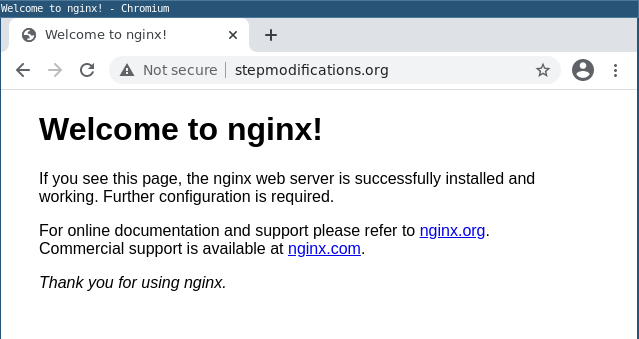
It seems contradictory, but your browser behaves this way because it is caching the HSTS rule that you are sending in your headers.
In fact, try from a fresh browser with no previous state/memory, and the result is:
> [@z929669](#):
>
> Also, port 80 is open, but it won't serve up anything from there
Well, the Let's Encrypt challenge will always begin on port 80.
So unless you get your 301 redirect to work, the request is not going to end up being correctly served.
I'd try:
1. Checking `nginx -T` to make sure you don't have any other `default_server` port 80 virtualhosts that may be competing with your HTTP 301.
2. Killing off nginx fully to make sure that the effectively loaded configuration is the one that is actually on disk:
---
### Author:  [@z929669](https://community.letsencrypt.org/u/z929669)
#### Post date: [January 23, 2021, 4:59am UTC](https://community.letsencrypt.org/t/cert-renew-fail/143347/19 "2021-01-23T04:59:48Z")
UR awesome.
Indeed, I did have a default.conf file that must've come from a recent update. It was conflicting with my listed on 80, since it was the first nginx inclusion.
```nohighlight
root@tescurl -i 138.197.49.211
HTTP/1.1 301 Moved Permanently
Server: nginx
Date: Sat, 23 Jan 2021 04:57:34 GMT
Content-Type: text/html
Content-Length: 162
Connection: keep-alive
Location: https://138.197.49.211/
301 Moved Permanently
301 Moved Permanently
nginx
```
All is fine and the world makes sense once more.
Thank you!
---
### Author:  [@system](https://community.letsencrypt.org/u/system)
#### Post date: [February 22, 2021, 4:59am UTC](https://community.letsencrypt.org/t/cert-renew-fail/143347/20 "2021-02-22T04:59:52Z")
This topic was automatically closed 30 days after the last reply. New replies are no longer allowed.